Reading a Kamstrup flowIQ 2200 with ESP32 and Home Assistant
Anatoly Mironov
I have a fairly new Kamstrup flowIQ 2200 water meter. Since I already use Home Assistant there, I wanted to get the water consumption into HA as well.
It turned out that the meter uses Wireless M-Bus on 868 MHz.
The meter broadcasts its readings over radio. The telegrams can be received by anyone nearby, but the actual data is encrypted with a key unique to the meter.
I contacted my water provider and asked if I could get the key for my meter. They confirmed that it uses Wireless M-Bus and sent me a Kamstrup .kem file together with a password.
From the KEM file I extracted the DEK, which is the AES key used to decrypt the telegrams.
WiMBIB
There is already a ready-made solution for this called WiMBIB. Btw, that company has also a comprehensive list of the Swedish municipalities that allow export of the encryption key.
It supports Kamstrup flowIQ 2200, Wireless M-Bus, MQTT and Home Assistant. It can also import the KEM file directly.
In other words, this would have been the easy solution.
It was out of stock when I looked at it, but I also wanted to use this as an excuse to learn a bit more about ESP32, SPI and radio modules. I have done some small soldering projects before, but this felt like a good next step.
The idea was also that ESP32 might be useful for other Home Assistant projects later.
So I decided to build it myself.
Hardware
The hardware is quite simple:
- ESP32-WROOM-32 development board
- CC1101 868 MHz transceiver
- 868 MHz spring antenna
- Dupont wires
- USB power supply
The CC1101 is connected to the ESP32 over SPI.
CC1101   ESP32
VCC   -> 3V3
GND   -> GND
MOSI  -> GPIO23
SCLK  -> GPIO18
MISO  -> GPIO19
GDO0  -> GPIO32
CSN   -> GPIO4
The antenna and wires had to be soldered to the CC1101. Despite my shaky hands (they are only shaky when I solder), I managed to do it on my first attempt.
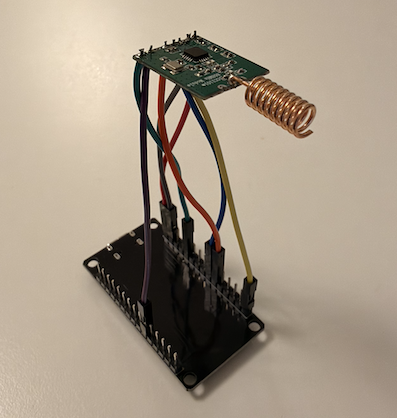
My first test was just to see if the ESP32 could talk to the CC1101 over SPI.
PARTNUM: 0x00
VERSION: 0x04
That worked, which was already a small success.
Listening
Before trying my own meter I wanted to see if the receiver could hear anything at all.
It could.
Quite a lot, actually.
Manufacturer : KAM
Meter ID     : 30605067
Device type  : 0x02
And then another one.
And another one.
KAM is the Wireless M-Bus manufacturer code for Kamstrup.
This was probably the most interesting part of the project. The receiver was just sitting on my desk and picking up water meter telegrams from several houses around me.
The meter ID and some metadata are visible, but the consumption data is encrypted. Without the DEK for a particular meter, the payload is just encrypted bytes.
Firmware
For the actual reader I used:
erikxson/watermeter-flowiq2200
I also created my own fork:
mirontoli/watermeter-flowiq2200
The project is made specifically for Kamstrup flowIQ 2200 together with ESP32 and CC1101.
It receives the Wireless M-Bus telegrams, filters on meter ID, decrypts them using the DEK and publishes the values over MQTT.
I used PlatformIO in VS Code to build and flash the ESP32.
MQTT
This was also the first time I had actually used MQTT myself.
I installed Mosquitto Broker in Home Assistant.
The setup is basically:
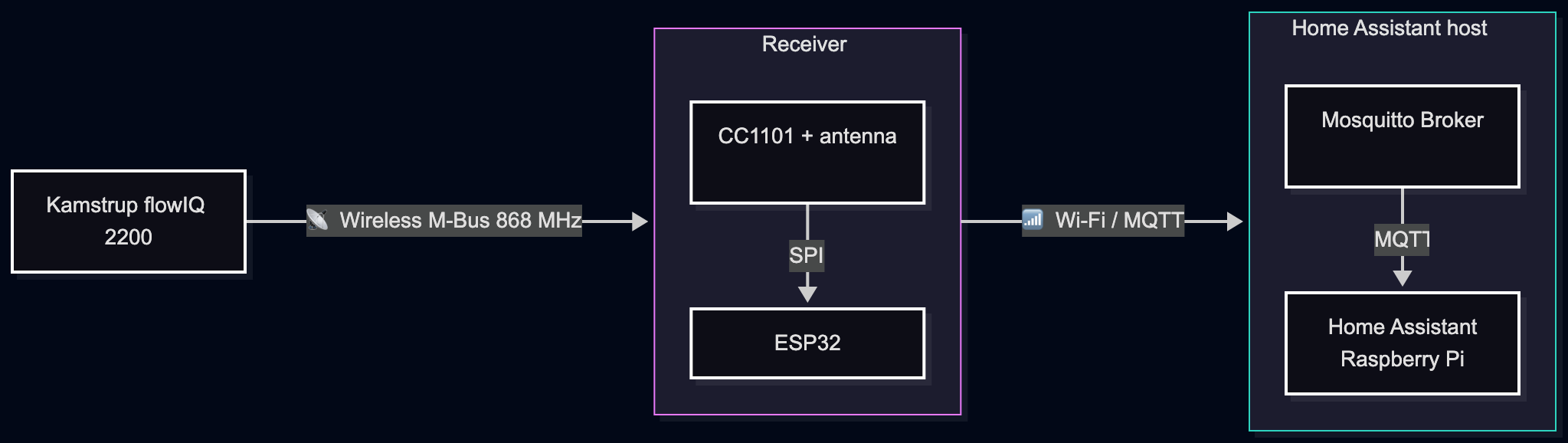
flowchart LR
    Watermeter[Kamstrup flowIQ 2200]

    subgraph Receiver
        direction TB
        CC1101[CC1101 + antenna]
        ESP32
    end

    subgraph H["Home Assistant host"]
        direction TB
        Mosquitto[Mosquitto Broker]
        HA[Home Assistant<br>Raspberry Pi]
    end

    Watermeter -->|📡 Wireless M-Bus 868 MHz| Receiver
    CC1101 -->|SPI| ESP32
    Receiver -->|📶 Wi-Fi / MQTT| H
    Mosquitto -->|MQTT| HA
The ESP32 publishes data like this:
{
    "MeterId": "54314804",
    "CurrentValue": 18.707,
    "MonthStartValue": 16.798,
    "FlowLph": 0,
    "FlowLphFull": -1
}
MQTT Discovery creates the device and sensors automatically in Home Assistant.
Home Assistant
Home Assistant now shows the meter as a normal device.
I get the accumulated consumption, month start value and flow information.
I also created Utility Meter helpers for:
- Water today
- Water this month
I decided to keep them in cubic meters with three decimals.
0.027 m³ = 27 litersThat is good enough for me and avoids creating extra template sensors just to convert everything to liters.
Wi-Fi was the weak link
I initially placed the ESP32 fairly close to the water meter.
That turned out not to be the best idea.
The 868 MHz reception worked fine, but the ESP32 eventually dropped off Wi-Fi. It was about 6–7 meters from the LTE router and the ESP32 only has its small PCB antenna.
I moved it closer to the router instead. It is now around three meters from the water meter.
It immediately came online again and still receives the water meter without problems.
So in my case the placement is determined more by Wi-Fi reception than by the Wireless M-Bus signal.
Worth doing
WiMBIB would definitely have been easier.
But then I would have missed most of the interesting part.
I now understand a bit more about Wireless M-Bus, how the meter broadcasts its data, what the DEK is used for, how CC1101 talks to ESP32 over SPI and how MQTT fits into Home Assistant.
And, perhaps more importantly, I now have an ESP32 setup that I can reuse for other projects.
That was really the point.