Todolist in VS
A really nice feature is a task list. Just write //TODO something something in your code and it appears in the task list which can be shown through View - Task List in Visual Studio. 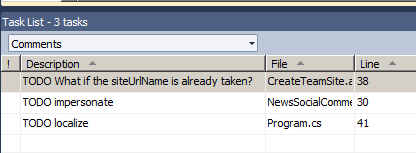
Sharepoint Warmup Script
It is useful to warm up a site after app pool recycling or after a site creation in development environments. I found a very simple script which I made even simpler:
$url = "http://takana"
$wc = new-object net.webclient
$wc.credentials = \[System.Net.CredentialCache\]::DefaultCredentials
$wc.DownloadString($url) | out-null
$wc.Dispose()
For more sophisticated warmups Wahid Salemi provided an interisting script to warm up your Sharepoint. By the way. Let us save it as a powershell function. Take a look at sharepointryan’s functions. Let’s create a proper function of that:
Resize image with jQuery to fit the div
There are many interesting jQuery plugins for resizing and cropping of images. Among them are jrac and image scale. I have tested the latter: It works very fine
$(window).load(function() {
    var $imgContainer = $("#layout-news-image");
    var $newsImg = $("#layout-news-image img\[rel!='sp\_DialogLinkIgnore'\]");
    $imgContainer.css("width", $imgContainer.parent().width());
    if ($newsImg.length > 0) {
	    if ($newsImg.width() < $imgContainer.width()) {
		    $imgContainer.width($newsImg.width());
	    }
	    if ($newsImg.height() < $imgContainer.height()) {
		    $imgContainer.height($newsImg.height());
	    }
	    $newsImg.imgscale({
		    parent : '#layout-news-image',
		    center: "true",
		    scale: "fill"
	    });
    }
});
```This script checks if the original image is lesser than container div and doesn't resize if it is so. **#layout-news-image img\[rel!='sp\_DialogLinkIgnore'\]** means that do not resize if there is a hidden image with rel="sp\_DialogLinkIgnore". See the [jQuery selectors](http://api.jquery.com/category/selectors/) for more info. This script can be improved by adding window resize event in javascript. I use **$(window).load** instead of the usual _$(document).ready_ because [ready-function in jQuery runs when DOM is loaded, if the page is not cached it happens before the image is loaded](http://web.enavu.com/daily-tip/daily-tip-difference-between-document-ready-and-window-load-in-jquery/). $(document).ready doesn't work.
comments from wordpress
sdfsdf — 2012-06-04
ListUrl on EventReceiver
When you create an eventreceiver, you get the ListTemplateId attribute.  It works fine. But if you want the eventreceiver to trigger on one particular list, just replace ListTemplateId attribute with ListUrl. For Pages you can use:
<?xml version="1.0" encoding="utf-8"?>
<Elements xmlns="http://schemas.microsoft.com/sharepoint/">
  <Receivers **ListUrl="$Resources:cmscore,List\_Pages\_UrlName;"**\>
    <Receiver>
      <Name>NewsPageEventReceiverItemUpdated</Name>
      <Type>ItemUpdated</Type>
      <Assembly>$SharePoint.Project.AssemblyFullName$</Assembly>
      <Class>Contoso.EventReceivers.NewsPageEventReceiver.NewsPageEventReceiver</Class>
      <SequenceNumber>1000</SequenceNumber>
    </Receiver>
  </Receivers>
</Elements>Change CA port number
In order to change port number for the Central Administration site, run this cmdlet:
Set-SPCentralAdministration -Port 1337You can set any number between 1023 and 32767 except 443.
Create own delegate control
In this post I’ll show how to create a simple (but own) delegate control. A short intro and links on delegate controls can be found on sharepointoverflow. Take a look on master page. There are already many delegate controls. The delegate control with id AdditionalPageHead can be used for adding your script or jQuery library.:
<SharePoint:DelegateControl
    runat="server"
    ControlId="AdditionalPageHead"
    AllowMultipleControls="true"/>
You can also override existing controls like searchbox. But what if you want to add some content in the master page where no delegate controls are present. Of course, you can add it directly to the master page. Perhaps not on all webs? You can use placeholders to manage it. But do you want to update all the page layouts? So the solution is to use delegate controls, for adding multiple pieces of content or overriding using Sequence. In this example I’ll add some new content to the quicklaunch bottom area:
SiteLogoImage to RootWeb
If you click on the site logo, as default you go to the current spweb’s default.aspx page. If you want to override this, locate:
<SharePoint:SPLinkButton
	runat="server"
	NavigateUrl="~site/"
	id="onetidProjectPropertyTitleGraphic" >
```Change ~site to ~sitecollection:
<SharePoint:SPLinkButton runat=“server” NavigateUrl="~sitecollection/" id=“onetidProjectPropertyTitleGraphic” >
Hide Site Actions
The easiest way to hide Site Actions for a specific audience is to wrap this into a SPSecuritityTrimmingControl. Locate this span in your master page:
<span id="siteactiontd">Paste this before the span element:
<SharePoint:SPSecurityTrimmedControl
    runat="server"
    Permissions="ManageLists">
Find the closing span tag:
</span>Paste this after it:
</SharePoint:SPSecurityTrimmedControl>Get all comments
If you try to get comments quantity for a url, you may wonder, why there is only quantity of the comments which the current user has posted:
public int GetNumberOfNewsPageComments
(SPSite currentSite, string pageUrl, int max)
{
var serviceContext =
SPServiceContext.GetContext(currentSite);
var socialCommentManager =
new SocialCommentManager(serviceContext);
var comments = socialCommentManager
.GetComments(new Uri(pageUrl), max);
if (comments != null)
{
return comments.Length;
}
return -1;
}
```The solution is to impersonate the SPSite object with an account who has the rights to manage social data. Give this permission to the account in CA - Application Management - Service Applications - User Profile Service. [](https://sharepointkunskap.files.wordpress.com/2011/09/manage-social-data.png)