11 Things I learned about chat bots in Teams
Recently we developed and published a chat bot in Power Virtual Agents for Teams (PVAforTeams). I would like to share my takes and lessons learned with you.
#1 Easy to edit, fun to work with
Bots in PVAforTeams are no-code solutions and provide a comprehensive graphical interface. Developers, analysts, business representatives can work together on defining topics, user flows. It has been really fun to shape the bot in a group - with a lot of laughter and interesting discussions about users’ work habits and how users search and find information. This is how the simplest topic looks like: Greeting:
Tips and tricks for Site Collection App Catalogs
Site Collection App Catalogs (SCAC) are much appreciated, thank you, Office 365 Team. Here is a couple of tips and tricks for SCAC.
Tip #1 You don’t need Tenant Admin rights to add a new Site Collection App Catalog
I have seen many blogs, forum threads etc that state that only Global Tenant Administrators can add new Site Collection App Catalogs. The truth is that a SharePoint Admin rights are enough. The trick is to make that SharePoint Admin Account to a site collection administrator of the app catalog site. To be precise the account that adds a new SCAC must have Manage Web Permissions, as stated in error message:
My first Office Add-In
Yesterday I participated in the Hackathon at European SharePoin Conference in Stockholm. The main goal was to learn more about Office Add-Ins. I wanted to create a very very simple app to learn the basics. Here in this post I’ll provide some links and describe the steps needed to start developing your Office Add-Ins. The Add-in I created is an Outlook Add-In, it is called “Joke Inserter” and with it you can insert a random Chuck Norris joke. It is just for fun, but it demonstrated how an add-in can be installed, made available in “New E-mail” and interact with the e-mail you are writing.
What is a SharePoint application
[caption id=“attachment_3759” align=“alignnone” width=“660”] A meaningful collection of Lego bricks is a toy. A meaningful collection of Lists, Fields, Files and other SharePoint artefacts becomes a SharePoint Application. Private picture.[/caption] App, Add-In, List, Web, Site, Sandbox solution, Workflow. There are too many words flying around in SharePoint that confuse users and Non-SharePoint-Developers. I want to introduce a “new” concept that is so simple and that a company can understand and govern: a SharePoint Application. That is so simple. It can be called a tool, a functionality. That can be a SharePoint list, a document library with a workflow, or a document library with custom jslink. All they can be SharePoint Applications. Let’s use lego as a metaphor. Have you seen this? [caption id=“attachment_3760” align=“alignnone” width=“660”]
 The same toy car in just brics. SharePoint Artefacts like Webs, Lists, Fields, Content Types, JSLink etc are just lego bricks. Private picture.[/caption] These lego bricks together become a cool toy that you can play with (as you can see in the picture above). So it is with SharePoint Applications, too. SharePoint Applications solve actual business needs. A List, or a JSLink by themselves do not solve a business need. It must be a meaningful collection of SharePoint Artefacts that becomes a SharePoint Application. Example Does the lego metaphor make sense to you? To go back to SharePoint, I’ll give you an example of a SharePoint Application. I would say everybody has done such Applications. In a project we created a document library for product icons that were used for all products in a company. Easy? Yes. But the icons had several states (active, inactive…). Versioning and Approval was required. A workflow for new requests and submits was implemented, too, permissions for different roles, metadata navigation in the document library and so on. Sure, SharePoint provided us with great “lego bricks”. But we created a tool, a functionality - a SharePoint Application, that makes sense to our business. What’s new then? Well, we all have done such applications. The new is to understand SharePoint Applications as an own alternative and quality assurance. See more below. Another example is an “App” for SharePoint Online that I converted into a SharePoint Application by adjusting it for SPO and OnPrem. That’s when I came up with the idea of the SharePoint Application. Definition
Http to Https Redirect in Provider Hosted Apps
It is strongly recommended to use https in SharePoint Provider Hosted Apps. In many provider hosted apps I have seen, only https works. I would recommend to configure a simple http to https redirect in IIS and make solutions better. Many Provider Hosted Apps can be done in that way that they are available without SharePoint Context, e.g. for browsing information. In that case that is important to have an easy url and an automatic http -> https redirect. In this post I’ll give a short manual for doing that. I would recommend this step for all provider hosted apps. 1. In the Provider Hosted Apps Server install the URL Rewrite IIS Module using Web Platform Installer:
Kom igång med SPMeta2
SPMeta2 (eller bara M2) är ett relativt nytt ramverk för provisionering av SharePoint-artefakter. Bakom ramverket ligger ett gediget arbete. I den här posten vill jag skriva upp mina steg för att sätta upp ett litet projekt. För mig är SPMeta2 nytt och huvudprincipen i den här bloggposten att få en fungerande lösning så snabbt som möjligt. Informationen här kan snabbt bli inaktuell, eftersom SPMeta2 förändras och förbättras väldigt snabbt. Vad är SPMeta2 SPMeta är ett ramverk för att provisionera SharePoint-artefakter, allt från fält, innehållstyper, listor, dokumentbibliotek, user custom actions, ladda upp filer med mera. Klassiskt har vi gjort provisionering med hjälp av XML-baserade moduler och features. SPMeta2 erbjuder ett Fluent API som är kodbaserat. Med hjälp av SPMeta2 definierar man en modell (enkla objekt POCOs) som inte har beroendet till SharePoint. Modellen används sedan av Provision-delen som anropar modellen för specifika versioner: SharePoint 2013, SharePoint 2010, Office 365 med mera. Man kan välja CSOM och SSOM. Provision är också flexibel vad som gäller paketering: det kan vara en konsolapplikation, en SharePoint-app, ett wsp-paket, en PowerShell-modul. Se följande länkar:
Onpremifying SharePoint apps
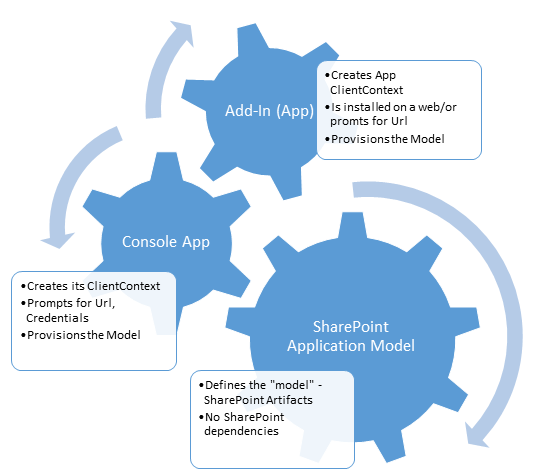 We want to make an app available in SharePoint OnPrem, we want to onpremify it. Rethink SharePoint apps and provisioning SharePoint artifacts. It has been a while since I updated my blog – Chuvash.eu. I had my vacation, I visited the sunny and green Chuvashia. Now I am back and I am looking forward to an awesome SharePoint Autumn. One of the first things I had to deal with in this SharePoint Autumn was Onpremifying of a SharePoint Online App. We have an app that has gained popularity and we want to make it available for SharePoint OnPrem. There is no such word Onpremify (yet?), I know, it is a Swenglish happy word making (onpremifiera), but I like the word “onpremify” a lot. There is still uncertainty around the purpose of SharePoint apps. One app type, though, has been used a lot in our company: an app that provisions SharePoint Artifacts – that creates SharePoint Applications. What I mean by SharePoint Applications can be read in my blog post:
Announcing web based SQL Max Memory calculator
 Today I want to announce a tiny web application for calculating max memory in the SQL Server to improve the overall performance in you SharePoint environment: SQL Max Memory Calculator. One of the important actions to improve the performance in SharePoint is fine tuning of the SQL Databases. Regarding the databases one of the crucial settings is the Max Memory Setting. You can read more about database optimizations for SharePoint in a whitepaper written by SharePoint MVP Vlad Catrinescu. The document is available on the SharePoint Community Web Site:
AppLoader Concept for SharePoint apps
In this post I want to share an unusual, nevertheless interesting conceptual idea of loading content from SharePoint 2013 apps on many pages. The original awesome concept was proposed and developed by my colleague Martin Villysson at Bool.
The problem we are trying to solve
SharePoint apps are great to extend functionality in SharePoint and integrate other systems (full page apps available through Site Contents), they also provide tools to enrich the default SharePoint experience by App Parts (Client Web Parts) and Custom Actions (additional menus).
Configuring VirtualBox for SharePoint-Hosted Apps
Recently I have switched from VMWare to VirtualBox for my SharePoint Development. So far it really works good. I have prepared this guide for configuring VirtualBox for SharePoint-hosted apps. That means we need a new adapter with a static ip address. All the steps done inside the virtual machine are applicable for VMWare and Hyper-V, too. This guide does not cover the full configuration of the app environment, it covers only the network and dns settings needed for SharePoint-hosted apps on Premises in a Development machine.