Using secrets in Logic Apps in a secure way
This is a guide for how to handle secrets in a logic app in a secure way. It combines three resources:
- Accessing Key Vault from Logic App with Managed Identity
- Get Secrets Key Vault API
- Hide your logic apps secrets from prying eyes

First, enable a Managed Identity for your Logic App:
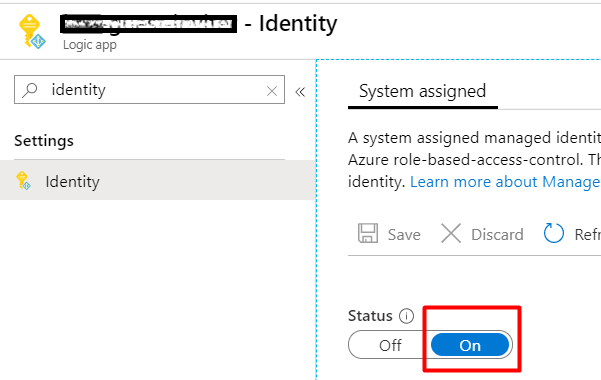
In the KeyVault, add a new Access Policy for the new Managed Identity (from the previous step). Use the least priviliges. In my case it is just enough with GET for secrets.
Filtering Azure Table Data directly in the Azure Function Binding
Instead of filtering values from an Azure Storage Table, you can do it directly in the bindings. It might not be a solution for everything, but in the right place, it is fantastic. I was very surprised to see how little code was needed after this binding change:
For that to work, define the filter attribute in the bindings: “filter”: “(PartitionKey eq ‘{package}’)”

To try it out, add a new row in a table defined in the bindings (“metadata” in my case):
Trust gulp-connect certificate from Visual Studio Online on Mac OS
I have read and followed this awesome post:
Getting SPFx working in Visual Studio Online by SPDavid.
I got my fingers and tried that guide out. This worked good, I spent some time, though, googling (binging) around to get rid of the SSL Warnings for the remote “localhost” on my Mac.
I would like to share this simple instruction on how to trust a self signed certificate from gulp-connect on Mac OS. The implication is that the certificate is on the remote linux machine (on the Visual Studio Environment), that you are connected to through the Visual Studio Code extension.
Tips and Trick for Azure Functions
These are my favourite tips and tricks. These are only those who me and my colleguages have tried out.
Architecture tips
Keep it slim
Functions should do one thing and they should do it well. When you develop it in C# and Visual Studio, it is so tempting to develop a “microservice” in a good way, you add interfaces, implement good patterns, and all of a sudden you get a monolith packaged in a microservice. If your function grows, stop, rethink. Better to see how it input and output bindings can be used. Also orchestration with Logic Apps or Durable Functions can help.
Simple Build for dotnet new react
I created a sample ASP.NET Core app with React.
dotnet new reactThen it took a couple of hours to get the build to work. Here is my working azure-pipelines.yml:
Resources:
S01E01 IoT: Posting Temperature from Raspberry Pi to Azure
Recently I have looked more at IoT, Raspberry Pi in my spare time. In my blog post I want to share my experience in a series of posts. This post is about measuring temperature, humidity and pressure with Raspberry Pi 2 Model B and Sense Hat and posting this data to Azure Table Storage. I followed this tutorial for connecting to azure with python and these instructions for reading data from Sense Hat. The python script is on github. Along the way I learned that only python 2.x can be used with azure and table names cannot contain underscore (I got Bad Request error when I tried to create a table with the name “climate_data”). But overall, the process was straightforward. The temperature is not correct, maybe because the sensor is inbetween Raspberry Pi and Sense Hat where it gets warm. But it is just a Proof-of-Concept. I have used Visual Studio 2015 to see the data in Azure Table Storage. For that I needed to install Azure SDK 2.7. There are many other “explorers” for Azure Storage.  Other resources Accessing Azure from Linux and Mac Improvement #1 Corrected Temperature I found a formula for calculating more correct temperature on the raspberry pi forum.