css3 transform
See Richards Bradshaw’s page with explanations and examples of css3 transform and transitions. His code is also available for forking on Github.
Bootstrap and Sharepoint
Twitter Bootstrap is awesome, based on less.js, ust add this line in your html code:
<link rel="stylesheet" href="http://twitter.github.com/bootstrap/1.3.0/bootstrap.min.css">And your page looks already good. If you use css classes like btn label warning danger and much more, you get a right design directly out of the box. Now I want to test it in Sharepoint. Will it work? What do you think? jQuery Theme Roller. Another interesting resources are jQuery ThemeRoller. WebResources Depot:
Reset favicon cache
Favicon is one of the hardest. Ctrl-F5 doesn’t help. You can of course see the source, find the location of the favicon, click on it (if you use Firefox or Chrome), otherwise copy the url and paste it in the address bar. When you load it separately, the favicon cache is renewed. It works. But if you want to make it easier for your users, set a version to your favicon file in the masterpage:
Hide my site link with css
Want to hide my site link without disabling social features. 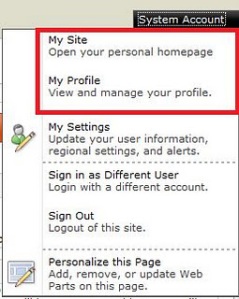 Well, the simplest way to do it is to use css:
#mp1\_0\_0\_Anchor { display: none; }
```If you want to hide my profile instead, just hide #mp1\_0\_1\_Anchor:
#mp1_0_1_Anchor { display: none; }
.ms-MenuUIUL li[text=‘My Site’] { display: none;}
##### Disable the my profile feature An even better solution is maybe to disable the ability to change the profiles. [Just remove the permission to "user personalization..." for All authenticated users in User Profile Service](http://blog.libinuko.com/2010/10/10/sharepoint-2010-howto-disable-my-site-and-my-profile-link/).comments from wordpress
John — 2012-03-03
s4-die
s4-die is a funny stuff. Now I realized the purpose of it. Everything that has to be hidden, Microsoft wraps in an element with class=“s4-die”. In corev4.css it is defined with display:none. Not so bad. Another approach is to create a invisible panel like Randy Drisgill has done. But with s4-die you don’t need to move your stuff around, just add the class s4-die. 
master page for html5 and css3
A great work: v5.master. I am recommending to try it. The problem are some javascript bugs in the IE 9 when you run IE mode 9 that are necessary to enable html5 and css3 support. You can’t “save” a list item:  The reason why it doesn’t work in IE, but in Chrome, Firefox, is that IE invokes some functionality that it doesn’t invoke in other browsers. Next: Enable Save button in IE9
Change the layout of Search Box without custom delegate control
The surest way to customize Search box in Sharepoint is to create a delegate control. In Sharepoint.Stackexchange there are many links to resources about this. But if you don’t have access to server or can’t deploy, the easiest way to do it is to style it with css. Thanks Steve Ottenad.
.s4-search .ms-sbgo a {
   background:url(../images/search\_btn.png) no-repeat;
   width:27px;
   height:22px;
   display:block;
}
.s4-search .srch-gosearchimg, .s4-search .ms-sbgo span {
   display:none;
}
First we hide the the default image and then we add our image for search button as background.
less.js
Det finns ett intressant projekt som kan hjälpa att strukturera css-filer. Du skriver regler i en kombination av css och javascript. Det omvandlas med hjälp av js till css. Projektet heter less.js, läs mer om detta på sharepointoverflow.
jQuery hide
Jag har alltid använt hide-funktionen i jQuery för att gömma vissa element som inte behövs i början. Det kan resultera att användaren ser skymningen av dem i laddningen av sidan. Vilket inte är så bra. Men det har visat sig, att hide behöver inte köras av jQuery. Bara göm dem med hjälp av css. jQuery show kommer funka ändå.
styra css för modaldialog
Säg du har application page med samma master page som resten av portalen. Men vad göra om du vill ändra css bara om den är i modal dialog. Overrida dina css-regler genom att lägga till .ms-dialog. .ms-dialog är css-klassen som läggs på html-taggen om sidan laddas i modaldialog:
html.ms-dialog body {
  background-color:white;
}