Provisioning Google Maps JSLink with SPMeta2
Anatoly Mironov
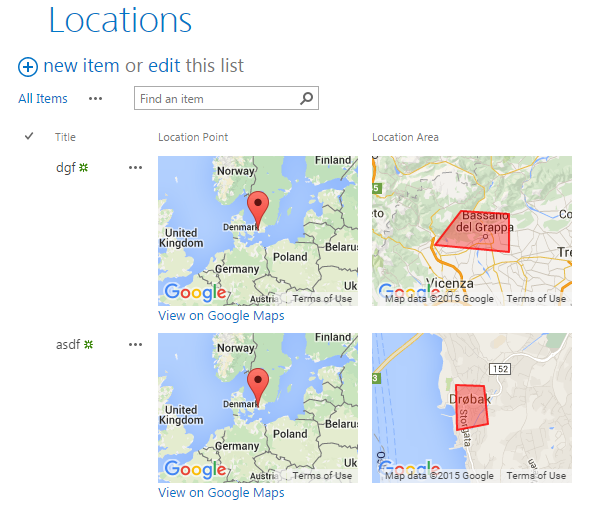
Among PnP Samples there is a solution for using Google Maps. Great solution where where you can pick a point on a map and define a spacial area on the map. Unfortunately it is a sandbox solution. I rewrote it to a code based template with SPMeta2 Framework. Now it can be installed on any site very easily, without needing UserCode Service and a cumbersome process of uploading a wsp package and activating it. The code is very simple, you can see it on github.

Let’s take a look at it. It does not contain a single line of SharePoint Legacy XML. There are following SharePoint artefacts that are getting provisioned:
- Two site columns (Location Point and Location Area)
- A SharePoint List (Locations) with two additional fields mentioned above
- Google Maps code in and CSR in a jslink file
- Auxiliary pages for selecting points and areas on the map.
Field Definitions
In SPMeta2 everything is separated in meaningful definitions. First we define our fields. The preferred place in the VS solution is Definitions - IA - Fields.

List Definitions
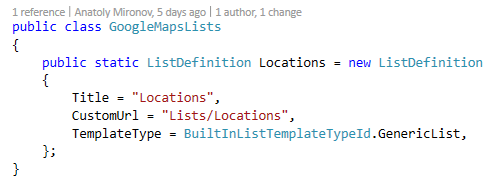
Then we define our List - Locations. That is also a SPMeta2 Definition. List Definitions reside in Definitions - IA - Lists. We do not add fields in our list definition. The fields are added while “assembling” the model.
ListView Definitions
ListView Definitions are also in the Definitions - IA folder. We inherit from the OOB AllItems view: 
Modules (a.k.a. Files)
Resource files like javascript, css, aspx, html and so on are Modules. They are in the “Modules - Implicit” folder. The internal structure is copied to the web folder. The upload of files is easy and is defined in the web model, see next section.
Web Model
Now it is time to pick the definitions and create a model. The most common model is a Web Model. The model is created programmatically and relies on “Add” methods: AddField, AddList and so on:

Provisioning
The actual provisioning is the most fun, it is easy and straight forward, it takes models and deploys it to a SharePoint site. You can easily switch between SSOM and CSOM. 
Distribution
Another bonus of SPMeta2 Provisioning Framework is the ability to serialize and deserialize models to XML or JSON. In our project we define SharePoint Applications as SPMeta2 models serialized in XML and make them available for installation on any SharePoint Site. A SharePoint Application is a meaningful collection of SharePoint artefacts that becomes an entity and solves a business need.
Summary
This Maps solution is a simple solution, but it is a very powerful one, originally created by the PnP team. If we just redesign the Provisioning Part, it becomes awesome. SPMeta2 provides a solid, well defined, easy-to-understand framework for define code-first models for SharePoint Applications.
comments from wordpress
Anatoly Mironov — 2016-10-03
Thank you. Спасибо.
Anatoly Mironov — 2016-10-03
You are right. Thank you for the thumbs up.
Dmitry Bardakov — 2016-10-03
offtopic:u ppbly misspeled “Vigorous” in ur CHUVASH abbrevation
Dmitry Bardakov — 2016-10-03
Ty 4 sharing, Anatoly, u saved my day!