Multiple events listeners in jQuery
Maybe it is not so often we face this situation where we one event handler for different events in javascript. But in my project I use many custom events and in some situations it is the same handler which listens to different events. What I found you can define multiple event listeners at the same time.
function myClick() { console.log("tada"); }
$(".selector").on({
  "click mouseover": myClick
});JSOM: Alter a column's ShowInDisplayForm property
When you create a content type, you can define if your fields will be shown in DisplayForm, EditForm, NewForm. You can hide or show them, just as Yaroslav Pentsarsky says. If your list is already provisioned, you can change them with Server Object Model, why not in PowerShell: Technet: Setting ShowInDisplayForm, ShowInEditForm, ShowInNewForm properties with powershell. If you don’t have access to the server, then the same can be done with JSOM. Here is the code:
JSOM: Last Modified Date of a List
The data transfer between server and client can heavily affect the performance. One of the measures to reduce the amount data transferred from the server to the client is storing data on the client. In many modern browsers we can use html5 localStorage. Even in older browsers there are ways to store data. I would recommend a nice js lib called amplify.js. The interface is much easier, then:
amplify.store("key", { title: "value" });
```It comes in nicely, if we have much data which we get with JSOM. But we have to care about eventual changes to list items done after we got them the last time. So we have to store the [last modified date](http://msdn.microsoft.com/en-us/library/microsoft.sharepoint.splist.lastitemmodifieddate.aspx). This property is also available in JSOM:
var ctx = SP.ClientContext.get_current(); var web = ctx.get_web(); var lists = web.get_lists(); var list = lists.getByTitle(“Tasks”); ctx.load(list, “LastItemModifiedDate”); ctx.executeQueryAsync( function() { var lastmodified = list.get_lastItemModifiedDate(); }, function() {} );
The original Visual Web Part template is missing in Visual Studio 2012
Today I encountered a weird issue, the classic Visual Web Part template was gone in Visual Studio 2012. When I created a Visual WebPart, a webpart was created with a generated .g.cs file, like the sandboxed visual webparts. I am not exactly sure why it happened. According to the MSDN guide Creating Web Parts for SharePoint, the structure of Visual Webparts should be the same as in Visual Studio 2010. It could have happened after I installed the power tools. However, if someone runs into the same issue, here is the solution: Copy this zip file from a computer with VS2010 installed:
The right URL regardless AAM zone
For a while ago my colleague gave me a nice tip of getting the right absolute url regardless sharepoint zone in Alternate Access Mappings. I want to share it, because it is brilliant:
var url = SPUtility.AlternateServerUrlFromHttpRequestUrl(new Uri(value)).AbsoluteUri;Windows 8: shutdown button on your start and desktop
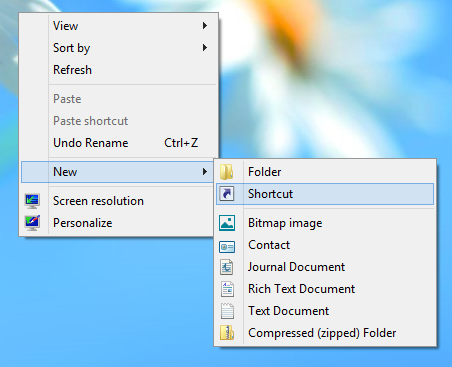
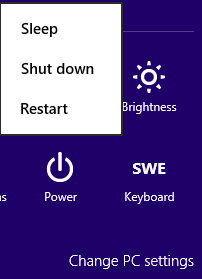 If you think that “Go to corner” -> Settings -> Power -> Shut down are three steps to much if you just want to shutdown your Windows 8 machine, than do as I did: create a shortcut on you desktop and a tile on your start screen. Create a shortcut as usual:
  Write in the location field:
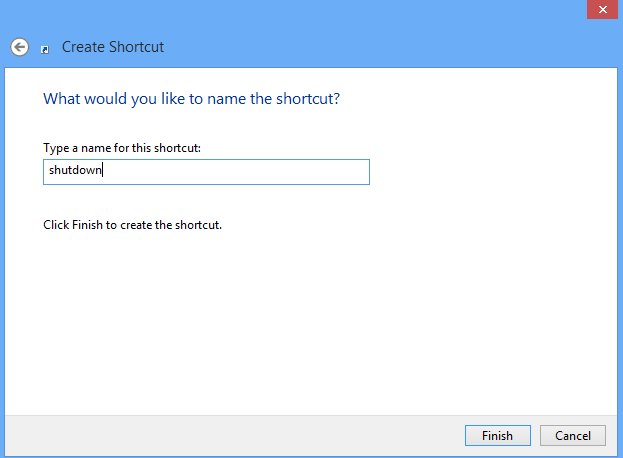
shutdown /s /t 0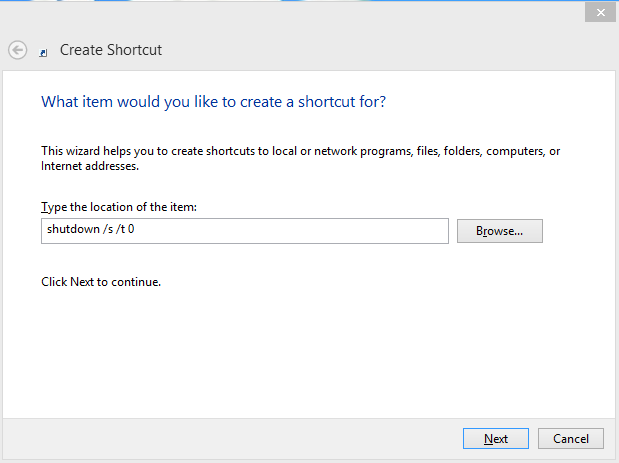 Name it something, why not “shutdown”?
  Change the default icon:
  There it is. Now we can pin it to Start:
  Done. Now, if you want to shutdown, you have to click only once:
 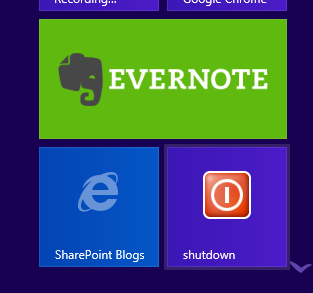 Enjoy!
Using SharePoint tooltips
I found a great post about using sharepoint tooltips on Andrey Markeev’s (@amarkeev, omlin) blog: JavaScript ToolTip’ы для SharePoint. He describes how he found the standard sharepoint tooltips and how they can be reused. The best part of it his “research”. Andrey’s conclusion is to create an own, simplified javascript class which enables “sharepoint” tooltips. I modified it somewhat. I think there is no need to instantiate a TooltipManager…
var Takana = window.Takana || {};
Takana.ToolTipManager = function () {

    var \_divId = "my\_tooltip";
    var \_innerDivId = "my\_tooltip\_inner";

    function createTitleAndDescriptionHtml(title, description) {
        return String.format(
            '<div>{0}</div><div>{1}</div>',
            title,
            description);
    }

    function showTooltip(element, rawHtml) {

        var tooltipDiv = $get(\_divId);
        if (tooltipDiv == null)
            tooltipDiv = createTooltip();

        $get(\_innerDivId).innerHTML = rawHtml;

        displayTooltipNextToElement(tooltipDiv, element);
    }

    function displayTooltipNextToElement(tooltipDiv, element) {

        tooltipDiv.style.display = '';
        var loc = Sys.UI.DomElement.getLocation(element);
        tooltipDiv.style.left = loc.x + 'px';
        tooltipDiv.style.top = loc.y + element.offsetHeight + 2 + 'px';

        if (tooltipDiv.curTimeout != null)
            clearTimeout(tooltipDiv.curTimeout);
    }

    function createTooltip() {
        var mainDiv = document.createElement('span')
        mainDiv.id = \_divId;
        mainDiv.className = 'ms-cui-tooltip';
        mainDiv.style.width = 'auto';
        mainDiv.style.position = 'absolute';

        var bodyDiv = document.createElement('div');
        bodyDiv.className = 'ms-cui-tooltip-body';
        bodyDiv.style.width = 'auto';

        var innerDiv = document.createElement('div');
        innerDiv.id = \_innerDivId;
        innerDiv.className = 'ms-cui-tooltip-glow';
        innerDiv.style.width = 'auto';

        bodyDiv.appendChild(innerDiv);

        mainDiv.appendChild(bodyDiv);

        document.body.appendChild(mainDiv);

        return mainDiv;
    }
    function hideDiv() {
        $get(\_divId).style.display = 'none';
    }

    var manager = {};
    manager.attachToolTip = function (element, title, description) {
        $addHandler(element, 'mouseover', function (e) {
            showTooltip(element, createTitleAndDescriptionHtml(title, description));
        });
        $addHandler(element, 'mouseout', hideDiv);
    }

    manager.attachToolTipRaw = function (element, rawHtml) {
        $addHandler(element, 'mouseover', function (e) {
            showTooltip(element, rawHtml);
        });
        $addHandler(element, 'mouseout', hideDiv);
    }
    return manager;
}();
Now a manager is created on a page per default. To add a tooltip, just use the TooltipManager:
Chuvash localization of moment.js
For three months ago I added Chuvash localization of moment.js. For 16 days ago moment.js 1.7.0 was officially released which included the Chuvash translation.
Wait a sec… What is moment.js?
 moment.js is the best datetime tool for javascript. It supports many languages (now even Chuvash) for displaying date and time. Another very handy functionality is showing relative time which has a simple interface:
 fromNow(). Here is a simple example from a web browser console:
Chuvash translation of Wikipedia Mobile
The official Wikipedia mobile app is now translated into Chuvash language and available to use: 
What does Chuvash mean?
I am Chuvash. Chuvash is the name of an ethnicity which counts up to 2 milions peoply (mostly in Russia). Chuvashes talk the Chuvash language which is also an official language in Chuvash Republic (besides Russian). Chuvash language is a Turkic language and has a status “Vulnerable” in the UNESCO list of languages in danger. There is a Chuvash Wikipedia cv.wikipedia.org.
Multiple instances of javascript webparts on the same page
Javascript has become popular among many SharePoint developers thanks to easy and fast jQuery, CSOM, SPServices and many other javascript libraries. That can make solutions modern and fast. On the other hand developers should be aware of more things (some of them at Bamboo Team Blog). One of those is scoping of javascript webparts. The problem a developer has to consider: what happens if a user creates two or more instances of the same beautiful webpart on the page? Let’s go and lab :) I’ll create a solution for this lab: sp-lend-id.ikkelen. This time it will be a sandboxed solution.  This solution contains a webpart: