MagicMirror2 and Chuvash
This post is about my setup of the popular MagicMirror2 application. I show the steps needed to set it up on a Raspberry Pi Zero W and connect it to a TV set. As a bonus, I share my thoughts on the Chuvash localization work.
MagicMirror2 is a DIY project and an open-source application, voted to number one of the best Raspberry Pi Projects. In essence, it shows information of your choice (weather, calendar, news) on a screen that is embedded in a mirror.
Filtering Azure Table Data directly in the Azure Function Binding
Instead of filtering values from an Azure Storage Table, you can do it directly in the bindings. It might not be a solution for everything, but in the right place, it is fantastic. I was very surprised to see how little code was needed after this binding change:
For that to work, define the filter attribute in the bindings: “filter”: “(PartitionKey eq ‘{package}’)”

To try it out, add a new row in a table defined in the bindings (“metadata” in my case):
Make a Rich Text Editor of any part part of the page

A while ago I had a case where I needed to implement a rich text editor in my custom webpart. I searched for answers. If you use some built-in field from SharePoint it is not editable in other browsers than Internet Explorer. I wanted the same experience as a wiki page where you can use the Ribbon. In this blog post I’ll show you how to implement this entirely in javascript, with no additional server side fields..
Update Field.JSLink using JSOM or REST
Today I have just a little code snippet to share. This code snippet shows how to update the JSLink property for an existing field using JSOM and REST. For REST I use sharepoint-utilities.
var updateJsLinkCsom = function (config) {
  var ctx = SP.ClientContext.get_current();
  var web = ctx.get_web();
  var lists = web.get_lists();
  var list = lists.getByTitle(config.listTitle)
  var fields = list.get_fields();
  var field = fields.getByInternalNameOrTitle(config.fieldTitle)
  field.set_jsLink(config.jsLink)
  field.update()
  ctx.executeQueryAsync()
};
var updateJsLinkRest = function (config) {
  SP.SOD.registerSod('sputils.js', '<your cdn endpoint>/sputils.min.js')
  SP.SOD.executeFunc('sputils.js', '', function () {
    var url = _spPageContextInfo.webAbsoluteUrl + '/_api/web/lists/getbytitle(\''
      + config.listTitle + '\')/fields/getbyinternalnameortitle(\''
      + config.fieldTitle + '\')';
    var payload = {
      '__metadata': {
        'type': 'SP.Field'
      },
      'JSLink': config.jsLink
    };
    var config = {
      'headers': {
        'X-HTTP-Method': 'MERGE'
      }
    };
    sputils.rest.post(url, payload, config);
  });
};
var config = {
  listTitle: '<your list title>',
  fieldTitle: '<your field title>',
  jsLink: '~site/<your jslink>'
};
updateJsLinkCsom(config);
updateJsLinkRest(config);
A couple of notes, to update a field we need:
Trigger SP2010 Workflows using JSOM
Today I found out how to start workflows in JSOM (JavaScript Object Model in SharePoint). Nothing special, but since it is not documented, it took me a while to find a solution. Here is the code which I want to keep as simple as possible. What you need to start a SP2010 Workflow for a list item or a document in JSOM, you need to load SP.WorkflowServices.js and you need to create the manager and get the service, then you can trigger a workflow using the workflow name, the list guid and the guid of the list item:
Create and download a file in javascript
Phew, I spent a lot of time to get this to work:
- Create a text based file in javascript - a simple csv or txt
- Download a file in Chrome and Internet Explorer
- Make Excel understand Unicode characters (å ä ö and many more) in csv directly.
I found many solutions on the Internet that I used to find out a solution that works for me A deep diving jsfiddle about unicode encodings, bom, line endings: http://jsfiddle.net/kimiliini/HM4rW (unfortunately, does not work in IE). There I learned one important thing: we need a BOM in order to make Excel understand that it is not just ASCII. The BOM (byte order mark) for utf-8 is %ef%bb%bf for utf-8. Without this bom you’ll see the right characters in a text editor (except Notepad of course), but if you open the csv file directly in Excel, you’ll see wrong letters. Other good resources are FileSaver.js: https://github.com/eligrey/FileSaver.js and download.js: http://danml.com/download.html and a discussion on that github repository issue: https://github.com/mholt/PapaParse/issues/175 This is my solution that is tested in Chrome and IE10:
Minimal Download Strategy. Simple
There are many correct ways (1, 2, 3, 4, 5…) of making scripts work with the Minimal Download Strategy Feature (MDS) in SharePoint 2013 and 2016. But to be honest - every time I need it, I get confused. So now it is time to find a simple solution for that. Who is better at it than the developers of the SharePoint themselves? Look at the MDS code in the built-in Display Templates:
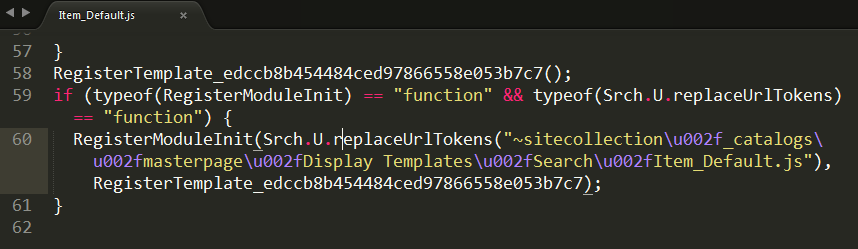
Minimal Display Template
We want to use our own Display Templates on Non-publishing sites - our team sites. Without the Publishing Feature activated you have to create an own javascript file. Here is short and concise instructions how to install it: Display Templates on Non-publishing Sites. As described on that blog, you can make copy of an existing Item_Default.js and adjust to your needs. I also asked Elio Struyf and I got the same tip. I did create my starter template. Here I want to share this very minimal javascript based Display Template. The real Minimal Display Template is in the SPCSR github repository: Item_Minimal.js It has been improved by Elio Stuyf himself :)
SharePoint Utilities - a promising JavaScript Framework
My colleagues at Bool have developed a new JavaScript framework for SharePoint - sharepoint utilities. It started on our DevDay last year - a whole free day when we could learn new things, try out new techniques or build something that was not even requested from a customer. I was not working on sharepoint utilities, so I almost forgot it until… I recently re-discovered sharepoint utilities. It is on Github, it is MIT licensed and contributions are welcome. The core of sharepoint utilities (sputils) is a set of wrappers for Search, TermStore, REST that allow you be more productive as a developer. What I find especially compelling with that it contains some other fundamental stuff that every SharePoint developer needs:
A tiny tool for User Custom Actions

Everybody loves User Custom Actions in SharePoint. That’s the only recommended way of customizing SharePoint. You have heard about it. Unfortunately there is no convinient way of administering them. People have their console applications or powershell scripts to add, update and delete user custom actions. It works but it is hard to open up Visual Studio or PowerShell every time you will try out an idea on a test site. To overcome this, I have created a tiny little tool, packaged as a bookmarklet for your browser. When you click on it, it will show your existing user custom actions and you can add new user custom actions. It is an ongoing little project, available on github, contributions are welcome. What’s left is: