Pragmatic Responsive Design
I have been curious about the responsive design but have not had time to try it out. To learn more I decided to make an existing website more responsive. A friend of mine drives a Chuvash Dictionary website: samah.chv.su. Today it looks like this in a mobile browser:

The site is a classic 1000px-ish centered page with header and two columns. The left column is for the main content and the right column for additional “aside” information. Can it be more classic? This current version works, you can still use the dictionary on a mobile phone. But there are several improvements that can be done:
Count lines of code with PowerShell
Today I got a question:
How many lines of code are there in our SharePoint solution?
After a little search, I found that PowerShell is really a nice tool to count lines of code:
I wanted to count lines for different types of code:
- Code Behind written in C#, the files have .cs file extension
- JavaScript code (except jQuery, angular or knockout frameworks)
- PowerShell files (.ps1 and psm1)
- Xml files (all the SharePoint .xml files)
Here is the powershell code that counts lines of code:
Debugging OOB SharePoint. Unable to post comments on SharePoint blogs (SP2013 June CU)
I have had a strange bug. The comment text box in a OOB SharePoint 2013 blog doesn’t appear. It only says: “There are no comments for this post.” In this blog post I’ll tell you how I found the bug and I’ll show you how you can temporarily bring the commenting to life.  I have had luck. While it doesn’t work on the Test Environment, it does actually work on my development machine. The comments text box is rendered as an OnPostRender action in the blog comments display template. After debugging the javascript in hours and comparing the two environments, I just could confirm that displaytemplates are the same. There are two main javascript files that are involved:
Log to ULS using javascript
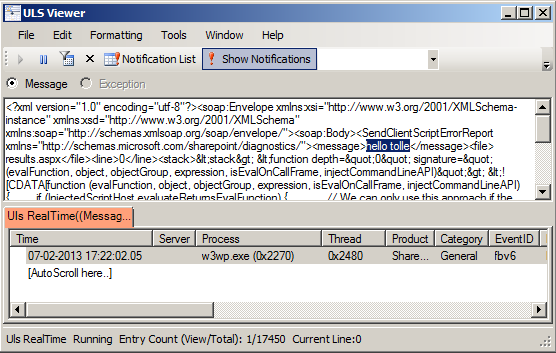 The more javascript code is produced in SharePoint solutions, the more need we have to log information and possible errors to a central logging place in SharePoint: ULS. This blog post is about logging to ULS from javascript. For a while ago I read a blog post:
The author @avishnyakov mentions the ability log to ULS from javascript. I want to dive deeper.
javascript: Alert Me on a Page
 Recently I needed to add an Alert Me link on Pages. Alert Me is a well known SharePoint functionality for notifying users about changes in list or list items. It is availabe in OOB SharePoint as a command in Ribbon if you go to a list view:
  When you click on this ribbon command, SharePoint opens a modal dialog and takes you to layouts page: SubNew.aspx. To open a modal dialog and load a page is not a rocket science. So a custom “Alert Me” link is doable. As the first step I copied the html markup from the ribbon and adjusted it a little bit.
javascript: Remove illegal characters in url
 Recently I needed to create valid urls for pages using javascript. Also this time I thought it must be some out-of-the-box code for that in SharePoint. The first thing I came up was the “Add page” dialog. I found that the actual dialog was in the _layouts virtual folder:
/_layouts/15/CreatePublishingPageDialog.aspxBingo, it does the validation in the client side. This is the responsible javascript function that resides directly in the page:
The CDN concept in SharePoint
How many instances of jquery are there in your SharePoint farm?
Get-SPWebApplication http://dev `
  | Select -Expand Sites `
  | Select -Expand AllWebs `
  | Select -Expand Lists `
  | Select -Expand Items `
  | ? { $_.Url -match "jquery.*.js" } `
  | select Name, Url
Have you more than two (jquery and jquery-ui), then you have too much. You can save much place and performance by using Content Delivery Network (CDN) links for the resources like javascript, css, fonts and icons. Consider those Content Delivery Networks:
Convert any web app to a SharePoint app
 Have you noticed that you can right-click a web application project in Visual Studio and convert it to a provider hosted app? Well why not? Basically your own website and a SharePoint manifest is all what you need for a provider hosted app.
  This discovery today made me think about all legacy web apps out there that can be converted to SharePoint apps. Traditionally we had to add plain links to external applications or embed them into an IFrame by hardcoding it in an .aspx page or a Page Viewer WebPart. A web application that should be converted to a SharePoint app can be any web app, not only asp.net web site. For a year ago, I had a little nodejs project to try out mongodb and knockout.js: Anvaska which I published as a heroku app:
SharePoint Apps: "Provider Hosted First" Approach

Recently I had an exciting mail conversation with Thomas Deutsch. He came up with an idea how to fasten the development of apps. This smart approach is called “Provider Hosted First”. See Thomas’ original blog post. Here are some highlights: What you actually do is a local website which runs in grunt server:
localhost:9000
```Then a SharePoint-hosted app is created with an SPAppIframe that refers to that local app site. Genious!!! Some key features of this approach:
* This local app contains a livereload script. Your sharepoint app is updated every time you save your css, js, html file in your IDE
* Grunt minifies, bundles your assets
* Grunt runs your tests automatically when your content is modified
* The SharePoint app can be on Premises, on Office 365, wherever you want it.
#### Video
\[caption id="attachment\_2808" align="alignnone" width="630"\][](http://www.screenr.com/LA8H) See the video how it looks like to develop using this approach\[/caption\]comments from wordpress
Paul Tavares — 2013-07-03
Make javascript code work with Minimal Download Strategy Part 2
I have a newer blog post about MDS, that provides a much simpler solution. Please check it before reading further.
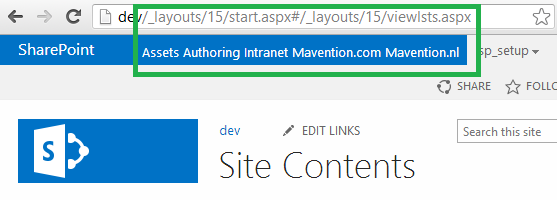 Minimal Download Strategy (MDS) is an important feature in SharePoint 2013. It lets you download only a page delta, only changes. There is still issues with the MDS and custom scripts and almost no documentation on msdn or technet. In this blog post I want to learn more about adjusting custom scripts for MDS. As in my previous post, I want to take a real problem and try to solve it. The goal is to find a solution, not nececerilly the most optimal solution, at least for now.