Renaming site urls
I saw a demo of it on the European SharePoint Conference in Copenhagen in 2018. Sebastian Fouillade, who showed this, compared this big change with brain surgery. All the urls, all the connections. But now it is possible. Today I have seen it even in my standard release tenant.
It is really appreciated. Soon it will be possible to rename misspelled sites, like “devlepment” to “development” etc.

To rename you need to go the SharePoint Admin, find your site among Active sites and click on “Edit” in the site url area.
A user can only create 250 groups

A non-admin user can create no more than 250 resources in Azure AD. That is one of the many Azure AD service limits and restrictions. A “resource” can be an app registration, an Office 365 Group etc. But I would like to discuss Groups more in detail.
Imagine the following scenario: Your organization has disabled Office 365 Group Creation. Only IT can create new groups. A service account has been set up for creation of team sites. The application permissions are “binary”, either everything or nothing: Group.ReadWrite.All. This service account will hit the limit very soon.
Tips and tricks for Site Collection App Catalogs
Site Collection App Catalogs (SCAC) are much appreciated, thank you, Office 365 Team. Here is a couple of tips and tricks for SCAC.
Tip #1 You don’t need Tenant Admin rights to add a new Site Collection App Catalog
I have seen many blogs, forum threads etc that state that only Global Tenant Administrators can add new Site Collection App Catalogs. The truth is that a SharePoint Admin rights are enough. The trick is to make that SharePoint Admin Account to a site collection administrator of the app catalog site. To be precise the account that adds a new SCAC must have Manage Web Permissions, as stated in error message:
Just because I can should I use Private Office 365 CDN
This is about a topic brought up by Waldek Mastykarz: Just because you can should you use the Office 365 CDN. In my post I want to take a closer look at the private CDN option in Office 365. Please note, the whole thing is subject to change, and it reflects the circumstances at the time of writing - 2019-08-26.

I’ll skip the introduction of Office 365, let’s jump directly to the Private CDN option. Consider following scenarios.
My first Office Add-In
Yesterday I participated in the Hackathon at European SharePoin Conference in Stockholm. The main goal was to learn more about Office Add-Ins. I wanted to create a very very simple app to learn the basics. Here in this post I’ll provide some links and describe the steps needed to start developing your Office Add-Ins. The Add-in I created is an Outlook Add-In, it is called “Joke Inserter” and with it you can insert a random Chuck Norris joke. It is just for fun, but it demonstrated how an add-in can be installed, made available in “New E-mail” and interact with the e-mail you are writing.
Onpremifying SharePoint apps
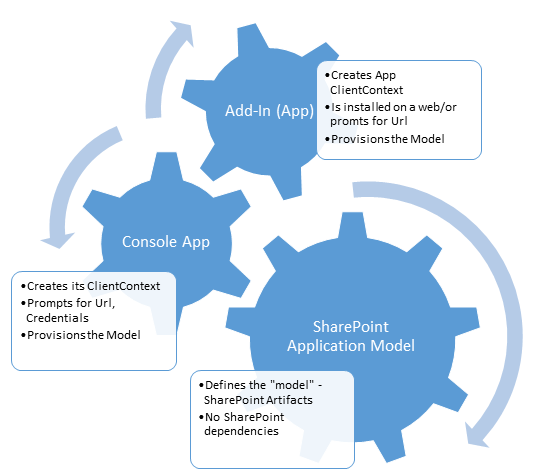 We want to make an app available in SharePoint OnPrem, we want to onpremify it. Rethink SharePoint apps and provisioning SharePoint artifacts. It has been a while since I updated my blog – Chuvash.eu. I had my vacation, I visited the sunny and green Chuvashia. Now I am back and I am looking forward to an awesome SharePoint Autumn. One of the first things I had to deal with in this SharePoint Autumn was Onpremifying of a SharePoint Online App. We have an app that has gained popularity and we want to make it available for SharePoint OnPrem. There is no such word Onpremify (yet?), I know, it is a Swenglish happy word making (onpremifiera), but I like the word “onpremify” a lot. There is still uncertainty around the purpose of SharePoint apps. One app type, though, has been used a lot in our company: an app that provisions SharePoint Artifacts – that creates SharePoint Applications. What I mean by SharePoint Applications can be read in my blog post:
Export any web part from a SharePoint page
The blog post below describes the technical details about how Web Parts can be exported using a hidden tool in OOB SharePoint, though this requires manual assembling of a special url. If you are just interested in a solution for an easy Web Part Export function, just proceed directly to my new blog post where you can download my tool that you can add to your web browser.
AppLoader Concept for SharePoint apps
In this post I want to share an unusual, nevertheless interesting conceptual idea of loading content from SharePoint 2013 apps on many pages. The original awesome concept was proposed and developed by my colleague Martin Villysson at Bool.
The problem we are trying to solve
SharePoint apps are great to extend functionality in SharePoint and integrate other systems (full page apps available through Site Contents), they also provide tools to enrich the default SharePoint experience by App Parts (Client Web Parts) and Custom Actions (additional menus).
What about the SharePoint app domain?
This is an open question about the domains for SharePoint apps. On Technet: Configure an environment for apps for SharePoint (SharePoint 2013) we can read the following:
You must configure a new name in Domain Name Services (DNS) to host the apps. To help improve security, the domain name should not be a subdomain of the domain that hosts the SharePoint sites. For example, if the SharePoint sites are at Contoso.com, consider ContosoApps.com instead of App.Contoso.com as the domain name.
The CDN concept in SharePoint
How many instances of jquery are there in your SharePoint farm?
Get-SPWebApplication http://dev `
  | Select -Expand Sites `
  | Select -Expand AllWebs `
  | Select -Expand Lists `
  | Select -Expand Items `
  | ? { $_.Url -match "jquery.*.js" } `
  | select Name, Url
Have you more than two (jquery and jquery-ui), then you have too much. You can save much place and performance by using Content Delivery Network (CDN) links for the resources like javascript, css, fonts and icons. Consider those Content Delivery Networks: