Make a Rich Text Editor of any part part of the page

A while ago I had a case where I needed to implement a rich text editor in my custom webpart. I searched for answers. If you use some built-in field from SharePoint it is not editable in other browsers than Internet Explorer. I wanted the same experience as a wiki page where you can use the Ribbon. In this blog post I’ll show you how to implement this entirely in javascript, with no additional server side fields..
Trigger SP2010 Workflows using JSOM
Today I found out how to start workflows in JSOM (JavaScript Object Model in SharePoint). Nothing special, but since it is not documented, it took me a while to find a solution. Here is the code which I want to keep as simple as possible. What you need to start a SP2010 Workflow for a list item or a document in JSOM, you need to load SP.WorkflowServices.js and you need to create the manager and get the service, then you can trigger a workflow using the workflow name, the list guid and the guid of the list item:
Minimal Download Strategy. Simple
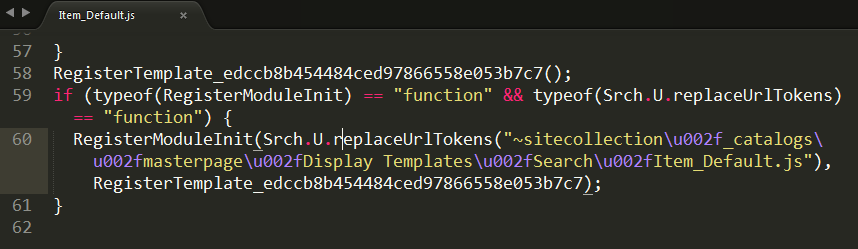
There are many correct ways (1, 2, 3, 4, 5…) of making scripts work with the Minimal Download Strategy Feature (MDS) in SharePoint 2013 and 2016. But to be honest - every time I need it, I get confused. So now it is time to find a simple solution for that. Who is better at it than the developers of the SharePoint themselves? Look at the MDS code in the built-in Display Templates:
A tiny tool for User Custom Actions

Everybody loves User Custom Actions in SharePoint. That’s the only recommended way of customizing SharePoint. You have heard about it. Unfortunately there is no convinient way of administering them. People have their console applications or powershell scripts to add, update and delete user custom actions. It works but it is hard to open up Visual Studio or PowerShell every time you will try out an idea on a test site. To overcome this, I have created a tiny little tool, packaged as a bookmarklet for your browser. When you click on it, it will show your existing user custom actions and you can add new user custom actions. It is an ongoing little project, available on github, contributions are welcome. What’s left is:
Export any web part from a SharePoint page
The blog post below describes the technical details about how Web Parts can be exported using a hidden tool in OOB SharePoint, though this requires manual assembling of a special url. If you are just interested in a solution for an easy Web Part Export function, just proceed directly to my new blog post where you can download my tool that you can add to your web browser.
Export SharePoint List Data To Xml through PowerShell
Today my colleague Johannes Milling wrote an awesome post: Export SharePoint List Data To XML Directly from the GUI He uses the old and forgotten RPC-based web service owssvr.dll (that has existed since SharePoint 2003). This url pattern is used to get the xml-formatted list data for a specific ListView:
http://<site_url>/_vti_bin/owssvr.dll?Cmd=Display&List=<list guid>&View=<view guid>&Query=*&XMLDATA=TRUETo automate this I have written a PowerShell function. All the details are in the comments:
Improving the web performance of an intranet

All the “small” app parts, web parts, delegate controls, user controls, and other “packages” that “must” be delivered to the users on every page load of the Start Page of your Intranet.
Recently we made an investment to improve the performance of our intranet. We made many changes in different layers: SQL, Network, Browser upgrade and code. Here I want to tell about what code changes we did to improve the web browser performance. Please leave feedback if you find it useful. You can also share your suggestions. We measured the performance before our code changes and after them. We had amazing results. Unfortunately I can not share any numbers, but we improved the Time to First Byte, time to load event firing in the browser, memory consumption in the clients and, perhaps, the most important, we improved the perceived performance of the Intranet, the way how users experience the speed and UI responsiveness. To do this I got many ideas of my project colleagues and branch colleagues. Here is the list of changes we’ve implemented:
Showing Birthdays and Job Anniversaries in the Newsfeed

In our project we have a requirement to show birthdays and job anniversaries in the Newsfeed. The solution is simple (when you know it) but there has not been any information about it online, until today. I want to share a few lines of PowerShell code to enable Anniversary notifications in the Newsfeed. This desired piece of code was written by my colleague Emma Degerman. Enjoy:
$job = Get-SPTimerJob | ? {
  $_.TypeName -like "*.UserProfileChangeJob"
}
$job.GenerateAnniversaries = $true
$job.Schedule = [Microsoft.SharePoint.SPSchedule]::FromString("hourly between 55 and 55")
$job.Update()
The code retrieves the Timer Job that changes User Profiles, sets “GenerateAnniversaries” to true, then it updates the schedule to run it before the Activity Feed Timer Job and updates it. By the way, it is only applicable for SharePoint On Premises.
Debugging "What's happening" in Communities
Recently an issue was reported about count mismatches in SharePoint 2013 Communities. The number of replies in category tiles sometimes is different compared to the community stats in the web part called “What’s happening”. The actual number of replies is 1 in the figure below. The user who has reported has tried to add, update and delete discussions and replies.


I have invested some time debugging this issue. It would be pity to not share my findings. Well the first thing to do was to determine the type name for the “What’s happening” web part. To do so just edit the page and export the web part. In the exported .webpart file I saw that the type was Microsoft.SharePoint.Portal.WebControls.DashboardWebPart. With that knowledge it is time to open ILSpy, an awesome and free(!) assembly browser and decompiler. Load the “Microsoft.SharePoint.Portal” assembly from GAC into ILSpy. Then use F3 to search for DashboardWebPart:
Tip: Use the weakest CSS selectors

I am reading Mobile HTML5 written by Estelle Weyle. It is an awesome recap and new knowledge about html, css and javascript. I want to highlight one of tips I got: Use the weakest CSS selectors (can be found on page 204). We all know, that inline CSS and !important are evil. They have a higher level of specifity and override the standard cascade of the CSS rules. If you use !important, then it will be hard to override CSS rules when you really need it. After these two classic “evils” the evil number three is overqualifying of CSS selectors. You should really never add more classes or ids or elements than needed. Consider this: