Using CAML with SharePoint REST API
Do you prefer REST over CSOM as I do? I’ll skip the whys. Andrew Connell put it already in wrtiting so nicely. Well, if you do prefer REST, then you must have discovered some shortcomings of REST, or its incompleteness compared to CSOM. I think of:
- Inability to filter items based on multivalued taxonomy fields
- Inability to filter items based on user fields where user is added through a group, rather than directly, e.g. AssignedTo=[Me] combined with a SharePoint group.
- …
In such situations I was forced to use CSOM. Until yesterday. Yesterday I learned that we can actually use CAML queries in REST requests. This enables using REST in all situations. The REST API is still developed and many features are added. Maybe a particular operation that needs a CAML query today, can be supported in the core REST API and can be easily refactored then. But until then, we can use CAML queries in REST requests. Here are the important things about it:
What about the SharePoint app domain?
This is an open question about the domains for SharePoint apps. On Technet: Configure an environment for apps for SharePoint (SharePoint 2013) we can read the following:
You must configure a new name in Domain Name Services (DNS) to host the apps. To help improve security, the domain name should not be a subdomain of the domain that hosts the SharePoint sites. For example, if the SharePoint sites are at Contoso.com, consider ContosoApps.com instead of App.Contoso.com as the domain name.
First look at Yammer integration in SharePoint 2013 SP1
I have installed SharePoint SP1 on my development machine. Yammer and OneDrive links have appeared in the Central Administration:  If you go ahead and click “Configure Yammer”, you can activate it:
  Because:
Yammer is Microsoft’s recommended tool for social collaboration.
When you activate Yammer, you’ll get this dialog, and the Yammer link in the SuiteBar: 
 What happens when you click on Yammer, is that you are redirected to Yammer.com and you are prompted a login page. Then you have a usual yammer site with all your networks and stuff (in my case, SPC14 network):
  Then, if you go to your newsfeed, the following message is shown:
The sessions I attended
My colleagues and friends keep asking me what sessions I went to and what I would recommend to see on channel9 where all of them are publicly available. Here is my prioritized list of sessions:
- #spc325 Real-world examples of FTC to CAM transformations. This was the most exciting developer session. Vesa Juvonen takes the Cloud App Model to its maximum. Wanna know more about the future. See this session.
- #spc404 Build your own REST service with WebAPI 2. You know REST? You like $filter, $top and $select? Good, why not create an own api? You have all the tools in Visual Studio 2013. Just get inspired by Scott Hillier.
- #spc269 Developer audience keynote | What’s new for the Office & SharePoint developer. Get all the developer news presented at #spc14.
- #spc3999 SharePoint Power Hour - New developer APIs and features for Apps for SharePoint.
- #spc371 Developing socially connected apps with Yammer, SharePoint and OpenGraph. Chris Johnson talks about how to use Yammer API to post updates, like and comment from code. What if you wanted to send an update to Yammer from your Line-of-Business application? Very easy.
- #spc303 Advanced Performance Analysis for SharePoint. A real-world case study how performance of a SharePoint site is measured, captured and analyzed. Really interesting.
- #spc391 Deep dive into Mail Compose Apps APIs. Main compose apps are similar to SharePoint apps, they are run as iframes and can be used to update an email while writing it or start a workflow. Good stuff.
- #spc334 Real-world SharePoint architecture decisions. Wictor Wilén talked about his best topic: architecture decisions. He is probably the best in this area in the world, and his presentation becomes better and better every time he presents it.
- #spc3000 Changing the look of Search using Display Templates and CSR. You can do a lot of stuff using the Display Templates and Cliend-Side Rendering. See this session to get inspired and gather a deeper understanding how it works.
- #spc382 Managing Search Relevance in SharePoint 2013 and O365. How does XRANK work? Well it is complicated. This session is a must-see.
- #spc224 The SharePointConference.com Site: From Sketch to Launch to Live! Did you know that SharePointConference.com was built upon SharePoint? See this session to find out what was good in SharePoint for this site, and what workarounds and hacks were necessary to get it to work.
- #spc302 Advanced development patterns for SharePoint Apps. Provider-Hosted Apps are the best type of apps. Let’s see what examples and tips are provided in this session.
- #spc322 SharePoint 2013 Search display templates and query rules. An introduction to Search Display Templates.
- #spc301 Access is back! High-value, ’no code’, functional & flexible business apps with the new Access services. There were a lot of jokes in this session. Access apps are new “no-code” solutions and will replace the InfoPath solutions.
- #spc407 Deep dive into the SharePoint 2013 CSOM API’s. The name is not correct. It is a dive into the CSOM, but it is not deep. See it if you want an introduction, but please keep in mind, the examples don’t follow the javascript coding conventions.
- #spc381 Load testing SharePoint 2013 using Visual Studio 2013. Never used load-testing with Visual Studio? Got a 1.15 hr to kill? Well, see it to learn how to start the Visual Studio and what difference is between a web test and load test.
The sessions I wish I had attended:
Custom Error and Access denied pages in Sharepoint
Unfortunately in SharePoint 2013 the custom error pages are not applied: link 1, link 2. Hopefully there will be a hotfix that solves it.
comments from wordpress
ryan — 2014-03-05
I agree, I have seen a few about. Thanks for the post
Jon — 2014-03-02
I have seen a few blog posts about this, it is a common dislike about 2013. Nice post.
PowerShell: Migrate field choices to a termset
In my current project we are migrating a custom sharepoint solution from SharePoint 2010 to SharePoint 2013. One of the improvements is that we migrate custom field choices to Managed Metadata. Choice Fields were not intended to be so many. So now it is time to convert them to metadata terms. I have written a PowerShell script which copies all the choices from a field to a termset. The script uses Client Side Object Model (CSOM) to get the choice values and it uses Server Object Model to write data to the termset.
PowerShell: Get version and ProductId from an .app package
In my project I deploy some apps directly through the ObjectModel directly with PowerShell. The apps are built with TFS I have a script that installs or updates apps if there is a new version of the app. Previously I used Import-SPAppPackage to compare the version and productid with an existing app instance, but often I get this error:
The provided App differs from another App with the same version and product ID.
Count lines of code with PowerShell
Today I got a question:
How many lines of code are there in our SharePoint solution?
After a little search, I found that PowerShell is really a nice tool to count lines of code:
I wanted to count lines for different types of code:
- Code Behind written in C#, the files have .cs file extension
- JavaScript code (except jQuery, angular or knockout frameworks)
- PowerShell files (.ps1 and psm1)
- Xml files (all the SharePoint .xml files)
Here is the powershell code that counts lines of code:
Debugging OOB SharePoint. Unable to post comments on SharePoint blogs (SP2013 June CU)
I have had a strange bug. The comment text box in a OOB SharePoint 2013 blog doesn’t appear. It only says: “There are no comments for this post.” In this blog post I’ll tell you how I found the bug and I’ll show you how you can temporarily bring the commenting to life.  I have had luck. While it doesn’t work on the Test Environment, it does actually work on my development machine. The comments text box is rendered as an OnPostRender action in the blog comments display template. After debugging the javascript in hours and comparing the two environments, I just could confirm that displaytemplates are the same. There are two main javascript files that are involved:
Log to ULS using javascript
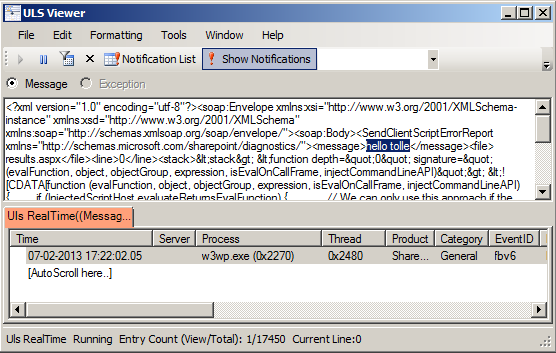 The more javascript code is produced in SharePoint solutions, the more need we have to log information and possible errors to a central logging place in SharePoint: ULS. This blog post is about logging to ULS from javascript. For a while ago I read a blog post:
The author @avishnyakov mentions the ability log to ULS from javascript. I want to dive deeper.