My five takeaways from the SharePoint Conference 2014
 The SharePoint Conference 2014 was an astounding event. Over 10 000 like-minded SharePointers that met, learned a lot and shared new ideas, couldn’t be better. It was also the first time I was to the U.S. and Las Vegas. What a country, what a city! This place must burn people’s lives faster than anywhere else in the world :) I want to share my five takeaways from this conference. I’ll keep it short:
Custom Error and Access denied pages in Sharepoint
Unfortunately in SharePoint 2013 the custom error pages are not applied: link 1, link 2. Hopefully there will be a hotfix that solves it.
comments from wordpress
ryan — 2014-03-05
I agree, I have seen a few about. Thanks for the post
Jon — 2014-03-02
I have seen a few blog posts about this, it is a common dislike about 2013. Nice post.
PowerShell: Migrate field choices to a termset
In my current project we are migrating a custom sharepoint solution from SharePoint 2010 to SharePoint 2013. One of the improvements is that we migrate custom field choices to Managed Metadata. Choice Fields were not intended to be so many. So now it is time to convert them to metadata terms. I have written a PowerShell script which copies all the choices from a field to a termset. The script uses Client Side Object Model (CSOM) to get the choice values and it uses Server Object Model to write data to the termset.
PowerShell: Get version and ProductId from an .app package
In my project I deploy some apps directly through the ObjectModel directly with PowerShell. The apps are built with TFS I have a script that installs or updates apps if there is a new version of the app. Previously I used Import-SPAppPackage to compare the version and productid with an existing app instance, but often I get this error:
The provided App differs from another App with the same version and product ID.
Count lines of code with PowerShell
Today I got a question:
How many lines of code are there in our SharePoint solution?
After a little search, I found that PowerShell is really a nice tool to count lines of code:
I wanted to count lines for different types of code:
- Code Behind written in C#, the files have .cs file extension
- JavaScript code (except jQuery, angular or knockout frameworks)
- PowerShell files (.ps1 and psm1)
- Xml files (all the SharePoint .xml files)
Here is the powershell code that counts lines of code:
Debugging OOB SharePoint. Unable to post comments on SharePoint blogs (SP2013 June CU)
I have had a strange bug. The comment text box in a OOB SharePoint 2013 blog doesn’t appear. It only says: “There are no comments for this post.” In this blog post I’ll tell you how I found the bug and I’ll show you how you can temporarily bring the commenting to life.  I have had luck. While it doesn’t work on the Test Environment, it does actually work on my development machine. The comments text box is rendered as an OnPostRender action in the blog comments display template. After debugging the javascript in hours and comparing the two environments, I just could confirm that displaytemplates are the same. There are two main javascript files that are involved:
Log to ULS using javascript
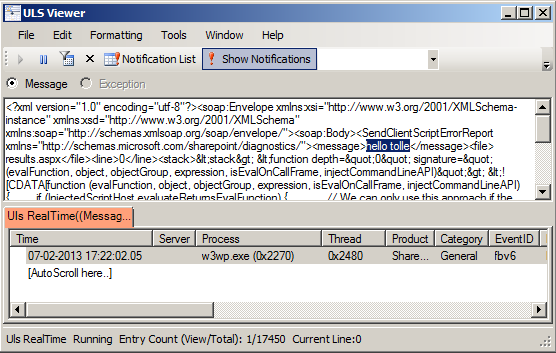 The more javascript code is produced in SharePoint solutions, the more need we have to log information and possible errors to a central logging place in SharePoint: ULS. This blog post is about logging to ULS from javascript. For a while ago I read a blog post:
The author @avishnyakov mentions the ability log to ULS from javascript. I want to dive deeper.
scriptcs and SharePoint. How SharePoint can benefit?

 Last Saturday I attended Leetspeak. Among many awesome speeches and presentations I discovered scriptcs.
  scriptcs lets you write C# code directly in the console, or execute scripts written with just your favourite editor. Please see more about it on the site. What I thought during Justin Rusbatch’s session at Leetspeak:
Can we use scriptcs in SharePoint?
Technically there is no limitations in SharePoint for scriptcs. Any .NET code can be registered, imported and invoked in a console or in a standalone script. Here is the simple code for instantiating a site collection and disposing it:
Apps can only call the OOB CSOM and REST endpoints
As a SharePoint architect or a SharePoint developer, you must have been thinking about the benefits/limitations of SharePoint apps a lot. I want to point out one of them today, which is very important: using custom webservices deployed to SharePoint inside apps. That is impossible and it is designed to be so due to the security architecture in the sharepoint app framework. I have read much about SharePoint apps (books, whitepapers, blog posts) and stumbled over these two contradictive statements:
javascript: Alert Me on a Page
 Recently I needed to add an Alert Me link on Pages. Alert Me is a well known SharePoint functionality for notifying users about changes in list or list items. It is availabe in OOB SharePoint as a command in Ribbon if you go to a list view:
  When you click on this ribbon command, SharePoint opens a modal dialog and takes you to layouts page: SubNew.aspx. To open a modal dialog and load a page is not a rocket science. So a custom “Alert Me” link is doable. As the first step I copied the html markup from the ribbon and adjusted it a little bit.