javascript: Remove illegal characters in url
 Recently I needed to create valid urls for pages using javascript. Also this time I thought it must be some out-of-the-box code for that in SharePoint. The first thing I came up was the “Add page” dialog. I found that the actual dialog was in the _layouts virtual folder:
/_layouts/15/CreatePublishingPageDialog.aspxBingo, it does the validation in the client side. This is the responsible javascript function that resides directly in the page:
The CDN concept in SharePoint
How many instances of jquery are there in your SharePoint farm?
Get-SPWebApplication http://dev `
  | Select -Expand Sites `
  | Select -Expand AllWebs `
  | Select -Expand Lists `
  | Select -Expand Items `
  | ? { $_.Url -match "jquery.*.js" } `
  | select Name, Url
Have you more than two (jquery and jquery-ui), then you have too much. You can save much place and performance by using Content Delivery Network (CDN) links for the resources like javascript, css, fonts and icons. Consider those Content Delivery Networks:
Convert any web app to a SharePoint app
 Have you noticed that you can right-click a web application project in Visual Studio and convert it to a provider hosted app? Well why not? Basically your own website and a SharePoint manifest is all what you need for a provider hosted app.
  This discovery today made me think about all legacy web apps out there that can be converted to SharePoint apps. Traditionally we had to add plain links to external applications or embed them into an IFrame by hardcoding it in an .aspx page or a Page Viewer WebPart. A web application that should be converted to a SharePoint app can be any web app, not only asp.net web site. For a year ago, I had a little nodejs project to try out mongodb and knockout.js: Anvaska which I published as a heroku app:
SharePoint Apps: "Provider Hosted First" Approach

Recently I had an exciting mail conversation with Thomas Deutsch. He came up with an idea how to fasten the development of apps. This smart approach is called “Provider Hosted First”. See Thomas’ original blog post. Here are some highlights: What you actually do is a local website which runs in grunt server:
localhost:9000
```Then a SharePoint-hosted app is created with an SPAppIframe that refers to that local app site. Genious!!! Some key features of this approach:
* This local app contains a livereload script. Your sharepoint app is updated every time you save your css, js, html file in your IDE
* Grunt minifies, bundles your assets
* Grunt runs your tests automatically when your content is modified
* The SharePoint app can be on Premises, on Office 365, wherever you want it.
#### Video
\[caption id="attachment\_2808" align="alignnone" width="630"\][](http://www.screenr.com/LA8H) See the video how it looks like to develop using this approach\[/caption\]comments from wordpress
Paul Tavares — 2013-07-03
Make javascript code work with Minimal Download Strategy Part 2
I have a newer blog post about MDS, that provides a much simpler solution. Please check it before reading further.
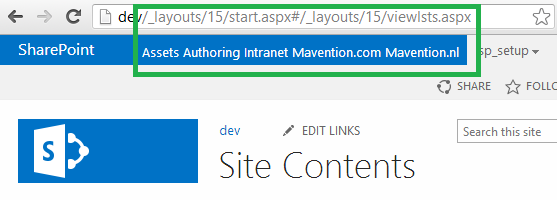 Minimal Download Strategy (MDS) is an important feature in SharePoint 2013. It lets you download only a page delta, only changes. There is still issues with the MDS and custom scripts and almost no documentation on msdn or technet. In this blog post I want to learn more about adjusting custom scripts for MDS. As in my previous post, I want to take a real problem and try to solve it. The goal is to find a solution, not nececerilly the most optimal solution, at least for now.
Make javascript code work with Minimal Download Strategy Part 1
I have a newer blog post about MDS, that provides a much simpler solution. Please check it before reading further.
 This is a part 1 of the blog post about Minimal Download Strategy and javascript adjustments for user code. What I initially thought should be enough for one post, is not enough, so I see it as a part 1. I wrote this post after I had read Chris O’Brien’s post about JSLink Here I want investigate how we can get his accordion list view working with MDS. Minimal Dowload Strategy or MDS is a new feature in SharePoint 2013. By now, if you read this post, you already know about it. The simplest way to see if MDS is enabled on your site, you can recognize it on the “ugly” urls. I don’t think they are so ugly. But it is a matter of taste and habit. No matter if you like MDS or not, MDS is enabled on many site templates and is a huge step towards a faster, more responsive architecture in SharePoint, I would say, towards the Single Page Application concept in SharePoint (but it is a long way to go). We have to keep the MDS in mind, when we write our customizations in javascript. SharePoint 2013 loves javascript and the probability is high that you write a lot of javascript. If it doesn’t work with MDS, your code breaks and the user doesn’t see the functionality, or the site owner must disable the Minimal Download Strategy feature. I wouldn’t like to have disabling of an improvement feature as a prerequisite for my code. In this blog post I want to dig into the techniques for getting the javascript code working with MDS. For a while ago I read a wonderful blog post in Chris O’Brien’s blog:
Styling suiteBar and IE8

Today I want to share little css tip for styling the suiteBar in SharePoint 2013 and making it work even in IE8. I needed to apply a green color to the suiteBar (#005128). It worked in all browsers except IE8:

The reason why is a special css rule (in corev15.css) that only IE8 understands:
.ms-core-needIEFilter #suiteBarLeft {
  filter: progid:DXImageTransform.Microsoft.gradient(GradientType=0,
    startColorstr=#ff0072c6,endColorstr=#ff0072c6);
}
I found this answer in an blog post written by Trace Armstrong: SharePoint 2013 – Branding the Top Bar and the Importance of Browser Testing. You could override this css rule with your colors, just dig into the msdn documentation. What I needed though, was just a plain color, so I didn’t want to dig into that old progid-definitions. There is actually a simpler solution on social.msdn.microsoft.com. A guy called avshinnikov just overrides the “filter” rule by setting it to none. If you apply it only with id selector (#suiteBarLeft) then you have to put “!important” after that. Fortunately I allready had my own css class on html tag which is a sort of a “namespace” for my selectors:
AutoSPInstaller: error while stopping the default web site in IIS
 During an installation with AutoSPInstaller on my development machine I ran into a strange issue. I got the following error:
System.IO.FileNotFoundException: Could not load file or assembly ‘Microsoft.IIS.PowerShell.Framework’ or one of its dependencies
I haven’t found any other people having the same problem with the AutoSPInstaller, but I found a similar report on another forum: help.octopusdeploy.com. Maybe I am the only one who gets this error in AutoSPInstaller, if not it can be useful to write the solution down. The error occurs when the default web site in IIS is stopped. For some reason Get-WebSite cmdlet throws an exception the first time you invoke it, but not the second time. To get it working I followed the tip from the help.octopusdeploy.com and wrapped the Get-Website code in a try-and-catch, where the same cmdlet was in try and in catch. This line:
Multi-lingual "Last Modified" footer
You want to show when a page is last modified? The label should, of course, work in multi-language environment. For MOSS, there is a great article about how to achieve this: Jamie McAllister. Building a multi-lingual ‘Last Modified’ Footer for MOSS. Here is a simple example for doing the same in SharePoint 2013:
<%@ Register
  TagPrefix='SharePointWebControls'
  Namespace='Microsoft.SharePoint.WebControls'
  Assembly='Microsoft.SharePoint, Version=15.0.0.0, Culture=neutral, PublicKeyToken=71e9bce111e9429c'
%>
<SharePointWebControls:EncodedLiteral
  runat='server'
  Text='<%$Resources:cms,pagesettings_modifieddate_label%>'
  EncodeMethod='HtmlEncode' />
:
<SharePointWebControls:DateTimeField
  runat="server"
  FieldName="Modified"
  ControlMode="Display" />
It fetches the localized value from cms.resx and puts it into your page as html.
REST API: Add a plain text file as an attachment to a list item
 SharePoint 2013 REST API has been enhanced and extended. The old _vti_bin/listdata.svc is still there, but the new api for working with lists and list items is much more and obviously a part of a bigger api: _api/web/lists Yesterday I saw an interesting question on SharePoint StackExchange:
The instructions in the MSDN resource are not so detailed, the cannot be. The guy who asked the question did as it stood in the examples. But sometimes solutions for SharePoint need some small adjustments :) Here is the simplest code to create an attachment in plain text for a list item 1 in the list called List1 in the root web. That’s it. But it works: