Disabling a column in Quick Edit
Anatoly Mironov
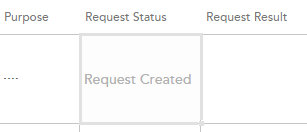
In my project I have a column called Request Status. This column is not shown in any forms, meaning users should not edit, because it is controlled through the app. Nevertheless it is editable in the Quick Edit. Yesterday I wrote about jsgrid in my blog. Now comes more. Today I’ll share a little practical solution how one can disable editing a field in Quick Edit. The field is edited in jsgrid, but to disable it, we only have set the property called AllowGridEditing to false on our column (not even touching the heavy jsgrid api). We can do in the OnPreRender event in our Client Side Rendering (CSR) registration. Having the context object we have access to the Fields (ContextInfo.ListSchema.Field):
(function () {
  var overrideContext = {};
  overrideContext.Templates = overrideContext.Templates || {};
  overrideContext.Templates.OnPreRender = function (ctx) {
    var statusField = ctx.ListSchema.Field.filter(function (f) {
      return f.Name === 'Request_x0020_Status';
    });
    if (statusField) {
      statusField[0].AllowGridEditing = false;
    }
  }
  SPClientTemplates.TemplateManager.RegisterTemplateOverrides(overrideContext);
})();
Another way is to implement the display form:
(function () {
  var view = function (ctx, field) {
    if (ctx.inGridMode) {
      field.AllowGridEditing = false;
    }
    return window.RenderFieldValueDefault(ctx);
  };
  var overrideContext = {};
  overrideContext.Templates = overrideContext.Templates || {};
  overrideContext.Templates.Fields = {
    'Request_x0020_Status': {
      'View': view
    }
  };
  SPClientTemplates.TemplateManager.RegisterTemplateOverrides(overrideContext);
})();
comments from wordpress
Niki — 2014-12-00
Hi! Thanks for sharing this script, very usefull. My question is, how can I set the DefaultValue in the DataGrid with same field where I set AllowGridEtditing to false? Thanks, Niki
RP — 2015-05-02
Hi, Thanks for nice stuff , I want to enable editing for new item for existing item i want to disable editing your code disabled fully.plz help
Anatoly Mironov — 2015-08-01
Hi, you have to “find” all columns that matter and set AllowGridEditing to false.Use HTML5 javascript functions filter and forEach.
Renuka — 2015-11-04
Please help me with multiple column disabling with jslink in quick edit
Anatoly Mironov — 2015-05-02
Hi, you can create different functions for new and edit. In the edit you can disable editing in Quick Edit.
Anatoly Mironov — 2014-12-04
You can try this:
return window.RenderFieldValueDefault(ctx);But in some cases it doesn’t work. Then you need to return the field value:
return ctx.CurrentItem[ctx.CurrentFieldSchema.Name] || '';Disable a site collection column inside lists's quick edit grid | Question and Answer — 2015-08-02
[…] SharePoint 2013 supports disabling a site collection column inside the list’s quick edit grid link. so I tried to apply the same inside a custom list. So I wrote the following JSLink […]
Renuka — 2015-11-04
Hi, can you please help me to set “AllowGridEditing” to false for multiple columns? I tried repeating the code for “Request Status”, but it doesn’t seem to work.
wasif — 2015-08-01
how can i set AllowGridEditing to false for multiple columns ?
VJ — 2015-12-01
Hi Thanks for the help ful post, I am trying to sort values in multi choice field in quick edit, can you please help, I tried to write function to sort but it doesn’t apply to values in the columns
Drew Griffin — 2015-12-01
Is this script inserted in a CEWP above the quick edit web part or is it inserted somewhere else into existing code using SharePoint Designer? Or other method. Thanks for your help.
SharePoint 2013 – Disable multiple columns in Quick Edit | Why Didn't I Think of That? — 2016-02-02
[…] Anatoly Mironov, has another post that explains how to lock a single field in the Quick Edit. ( http://chuvash.eu/2014/11/28/disabling-a-column-in-quick-edit/ […]
Anurag — 2016-02-02
An update for multiple columns, hope this helps others : https://wditot.wordpress.com/2016/02/02/sharepoint-2013-disable-multiple-columns-in-quick-edit/
Anatoly Mironov — 2016-02-02
Great! Thanks for sharing! Now your blog post will be linked. I read your blog. Good stuff. Keep posting!
Jan Marek — 2016-02-03
Hi, thanx for this. But it didn´t quite work for me. This is what I loaded as a text file into the documents library (library has check out required). I assigned rights for that file just for me (the list views were created by others as public views but I have site collection admin rights on that SP site and placed the URL into CEWP in that view and clicked stop Editing. So here is the code I used
var updateViewerFields=["Actual Completion Date","Date of Update", "Start Date"]; (function updateView() { var overrideContext = {}; overrideContext.Templates = overrideContext.Templates || {}; overrideContext.Templates.OnPreRender = function(ctx) { for(j=0; j<ctx.ListSchema.Field.length; j++) { var f = ctx.ListSchema.Field[j]; for(i=0;i<updateViewerFields.length;i++){ if(f.DisplayName == updateViewerFields[i]){ f.AllowGridEditing=false; } } } } SPClientTemplates.TemplateManager.RegisterTemplateOverrides(overrideContext); })();but the columns are still editable. Any thoughts please? Many thanx again
Anatoly Mironov — 2016-02-04
You have to overrride the “View” behaviour of the fields. f.AllowGridEditing outside “View” override will not affect the field.
JV — 2016-06-05
Why not just use a calculated column? What I did was to create and set a calculated column to equal the value of the column I wanted to disable. Then I added the calculated column to the view of the Quick Edit. Calculated columns are not editable.
Chris Hernandez — 2016-08-06
Dear Anatoly, do you know how I can disable bulk edit in datasheet/quick edit view? Chris🤔
Farhan Aslam — 2017-05-04
Thanks
Saurabh shankar — 2017-06-04
Hi Anatoly I am trying to implement a scenario in which I want to restrict the users to select the choice options present with choice field in Quick edit more. For eg.- choice contains month names - Jan, Feb, March, Apr etc.. I want them to have only month options which is next three months. Any help is appreciated.
SShankar — 2017-06-04
Hi Anatoly I am trying to implement a scenario in which I want to restrict the users to select the choice options present with choice field in Quick edit more. For eg.- choice contains month names - Jan, Feb, March, Apr etc.. I want them to have only month options which is next three months. Any help is appreciated.