Two workarounds for overcoming the listview threshold
These are two workarounds to see documents / list items in a view that exceeds the listview threshold of 5000 items.

Overcoming the listview threshold is as fun as succeeding in the limbo games.
This is changing all the time. When you read this, it might have changed. Today, 2021-01-05, me and my colleague found following two workarounds for listing over 5000 items in a list view in SharePoint Online:
Teams incoming webhooks for performance monitoring
Incoming webhooks in Teams are great, indeed. Last week I saw this tweet, which inspired me to share one of our webhooks.

There are many scenarios where it can be used, I would also like to share one of our scenarios: notifying our DevOps team about performance issues in SharePoint Online, detected through Exoprise.

This adaptive card (in Swedish) shows an alarm from Exoprise about login problems.
Two site logos?
We have had troubles updating site icons in SharePoint Online. It might be related to one of the following:
- It occures only on hub sites
- The sites have a custom theme
The error message:
We experienced a problem updating the icon. Please try again in a few minutes.
But what I found is that there are two places where you change the site icon. If the first does not work, try the second one, that was what worked for us:
DIY: Integrating Trådfri lights with Teams presence
It seems that Work from Home (WFH) is here to stay, it’s okay. I’d say, Work from a Smart Home is even more okay. To me, Home Automation (HA) and Work from Home (WFH) are really two peas in a pod.
Today’s “guest” is a tiny application that I’ve set up on my raspberry pi to listen to my presence (status) in Teams and show it with colors of my smart RGB light (IKEA Trådfri).
Flashing Trådfri lights on Azure Alerts
What if you put together Work From Home and Home Automation? Well, removing the common denominator (HOME) would mean Work Automation (sic!). I want to tell you about a tiny hobby project I have had at home, still related to work of mine: Whenever an Azure alert is triggered, my Trådfri smart light from IKEA flashes for a couple of seconds.
Summary (if you want to skip the long story below): The solution is a tiny web application. The publicly accessible url, exposed using ngrok, is registered as a webhook in an Azure Alert. It’s on Github, you’re welcome to use it as you please 😎:
Automatically detect new sites in SharePoint Online

Original image by William Warby. https://www.flickr.com/photos/wwarby/16414155179/in/photostream/
Sites in SharePoint are created all the time, not only for SharePoint, but also as storage for Yammer, Teams, Planner and other services in Microsoft 365. There are ways to keep track of them, but the ability to automatically detect a new site creation is quite appealing. Automatic detection means a trigger of a Power Automate (Flow) or a Logic App.
There are a few blog posts that exactly describe how you can detect when a new site is created in SharePoint Online:
Is an M365 Group a Yammer Community

Nowadays a Yammer Community gets a corresponding Microsoft 365 Group (Office 365 Group, Unified Group). In your work as an SPO Admin, you might need to differentiate “ordinary” Modern Team Sites from those ones that were created for a Yammer Community.
They both have GROUP#0 as Template. On the actual SPO Site object, there is nothing that you can use to differentiate those. Neither you can use the Office 365 Group information. But there is a way: if you connect to Exchange Online and get the group from there, then there is something useful.
Estimated Completion in Write-Progress in PowerShell

Have you also got many sites in your tenant? Write-Progress is the bare minimum in a script that goes through all sites. But there is also another nice way to make easier to see the progress - estimated completion time.
Although the idea comes from another blog post (My life is a message), I thought it could be worth sharing it again, especially in the cloud context.
Here is a bit simplified scenario: Getting information for every site. The status message in Write-Progress contains also the estimated completion time.
Optimizing lookups in PowerShell
Have you had a PowerShell script that contains two bigger arrays and you wanted merge the information. It can become quite slow if you need to search for every item from array A through all items in array B. The solution is called a HashTable! It might be not an advanced tip for some, but I was really glad to see a huge improvement, so I decided to share it as a post.
Page Diagnostics for SharePoint
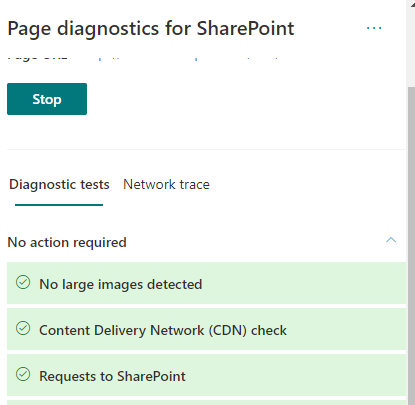
While trying to set up a new Home Site, I discovered that there is a tool (browser extension) called Page Diagnostics for SharePoint.

After running this, I tried that command again and it was smart enough to detect the problem the tool discovered.

Also Network Trace is available.
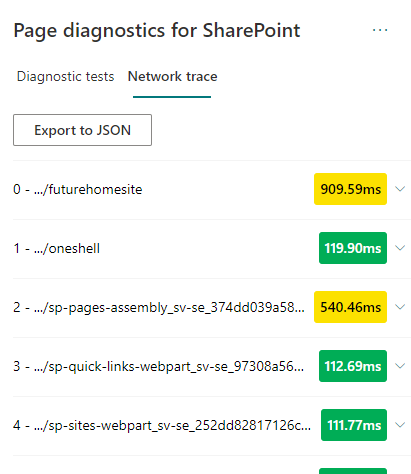
Network trace
Page Diagnostics Tool is defnitely a tool to have in the troubleshooting toolbelt for SharePoint.
Setting up a Home Site
Here is the script: