A powershell script for activating an eligible role assignment in Azure AD
Recently my role assignments in Azure AD were switched from permanent to eligible ones. This is part of PIM - Privileged Identity Management, you can read more about it on MS Docs:
To activate your eligible assignment you can use Azure Portal, Graph API, and PowerShell. The activation in the portal and Graph API is described on MS Docs:

Sites.Selected and Governance
The new permission in Graph API - Sites.Selected - is a step in the right direction. Since long we have been looking for ways of scoping the accesses to live up to the least privilege principle. It was either nothing or everything. I have tried out the new Sites.Selected permission and here are my findings.
First of all, if you haven’t heard about Sites.Selected, please visit these pages to find out more. I am skipping the introduction, since there are already good resources on that out there.
Monitoring Microsoft 365 using Raspberry Pi and M365 CLI
I would like to show you my recent hobby project with a raspberry pi, a unicorn phat and the powerful cli-microsoft365: A simple monitoring solution of Microsoft 365 Services.

Status of some important services in Microsoft 365
In essence, I put the unicorn phat onto the raspberry pi zero w and wrote this python script:
The python script checks the service status every five minutes and shows it with colors on the unicorn phat.
1TB=1024GB in SPO Storage
You want to calculate your storage capacity in SharePoint Online? Here is how:

- Every 1TB is 1024GB (it might be confusing, see my previous post, but it’s how it is calculated)
- A tenant gets 1024GB by default
- For every user license of a product that includes the service plan called “SHAREPOINTSTANDARD”/SharePoint Online (Plan 1) you get 10 GB extra
- For every user license of a product that includes the service plan called “SHAREPOINTENTERPRISE”/SharePoint Online (Plan 2) you get 10 GB extra
- For every user license of a product that includes the service called “ONEDRIVEBASIC”/SharePoint Online OneDrive Basic you get 0.5 GB extra
Products vs. Service Plans
A product (a.k.a. SKU) consists of service plans. E.g. Office 365 E3 (product) consists of SharePoint Online Enterprise among others. It is a Service Plan that gives you additional storage, not a product. The information on “SharePoint Limits” page is (over-)simplified. Simplified for a good reason of course - to give a rule of thumb for calculating your storage.
Print2SPO - en enkel utskrift till SharePoint
Den här bloggposten är ett (en aning större) användar- (eller verksamhetsutvecklar-)tips om hur man kan sätta upp smarta utskrifter till SharePoint Online - utan några extraappar eller lösningar.
Först och främst, stort tack till min kollega Shahram som har presenterat idén för mig. Tänk dig ett följande scenario:
Du har en mall i Word som du fyller i, skriver ut på papper. Låt säga, det är en plockorder. Du vill digitalisera processen genom att skicka pdf:en till ett gemensamt dokumentbibliotek i SharePoint eller Teams.
1 TB = 1024 GB in SPO?
There is confusion around how the storage is calculated in SharePoint Online. I believe, in SharePoint Online 1 TB is 1024 GB (based on powers of two), although the SI Prefix is for numbers based on powers of 10 (1TB = 1000GB, Wikipedia). In this post I would like to summarize the results of my investigations and I hope Microsoft or the community can confirm or disconfirm this.
First, let me explain why we care about it. The storage in SharePont is limited and we need to keep an eye on it. Especially in our case, where we need to track storage utilization across different parts of the organization/our tenant. The storage in SharePoint is calculated like so:
Demote News in SharePoint Online
In case you published a news in SharePoint Online and you now want to “downgrade” it to a regular page, I have a solution for you.
The reasons why you would like to demote a News might vary:
- You publish an important message, perhaps a note about an operational disturbance. It might not relevant anymore, but you still want to keep the page in case someone wants to access the information.
- You accidentally create a page as a news.
- …

Kombinera två SharePoint-listor i PowerBI
Det här är en enkel guide på svenska om hur du kan ladda in data från två eller fler listor i SharePoint och lägga ihop dem till en.
Scenariot är följande. Du har två eller fler sajter i SharePoint Online som har var sin lista (med samma kolumner). Du vill ladda in data från båda och se en aggregerad/summerad version. Alternativet är att ha en delad lista, men ibland (av behörighetskäl eller av behovet för smärre anpassningar av enskilda listor), ligger det i separata listor/sajter.
Add a security group as hubbers using PowerShell
Today I needed to add a security group to “People who can associate sites with this hub” through PowerShell. Here is quick how-to. I usually say “hubbers” instead of the long “People who….”. By the way, if you want to know what prerequisites there are for being a hubber, read my other blog post
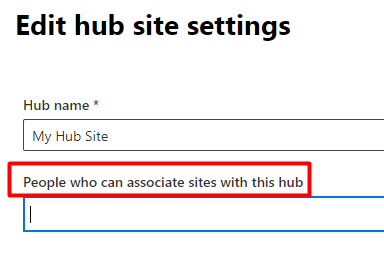
An example of how to add a security group is missing in the MS Docs:
Own praise badges in Teams

While reading the Teams News recap from December 2020, I found one thing that caught my attention particularly: Custom Praise Badges in Teams. Let’s try this. But first, those badges are the default ones:

They are good starting point. But to take it a step further, to really engage people and praise, you need some specific badges that mean something for your company.
To add a new badge all you have to do is to go to Teams Admin (obviously it requires you having the Teams Administrator Role):