Minimal Display Template
We want to use our own Display Templates on Non-publishing sites - our team sites. Without the Publishing Feature activated you have to create an own javascript file. Here is short and concise instructions how to install it: Display Templates on Non-publishing Sites. As described on that blog, you can make copy of an existing Item_Default.js and adjust to your needs. I also asked Elio Struyf and I got the same tip. I did create my starter template. Here I want to share this very minimal javascript based Display Template. The real Minimal Display Template is in the SPCSR github repository: Item_Minimal.js It has been improved by Elio Stuyf himself :)
SharePoint Utilities - a promising JavaScript Framework
My colleagues at Bool have developed a new JavaScript framework for SharePoint - sharepoint utilities. It started on our DevDay last year - a whole free day when we could learn new things, try out new techniques or build something that was not even requested from a customer. I was not working on sharepoint utilities, so I almost forgot it until… I recently re-discovered sharepoint utilities. It is on Github, it is MIT licensed and contributions are welcome. The core of sharepoint utilities (sputils) is a set of wrappers for Search, TermStore, REST that allow you be more productive as a developer. What I find especially compelling with that it contains some other fundamental stuff that every SharePoint developer needs:
A tiny tool for User Custom Actions

Everybody loves User Custom Actions in SharePoint. That’s the only recommended way of customizing SharePoint. You have heard about it. Unfortunately there is no convinient way of administering them. People have their console applications or powershell scripts to add, update and delete user custom actions. It works but it is hard to open up Visual Studio or PowerShell every time you will try out an idea on a test site. To overcome this, I have created a tiny little tool, packaged as a bookmarklet for your browser. When you click on it, it will show your existing user custom actions and you can add new user custom actions. It is an ongoing little project, available on github, contributions are welcome. What’s left is:
Provisioning Google Maps JSLink with SPMeta2
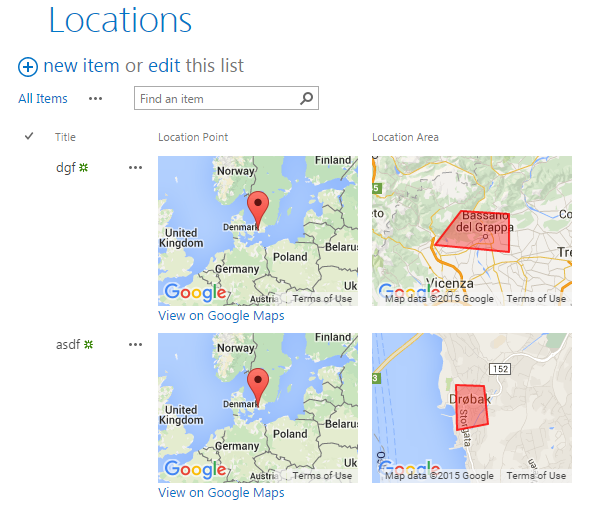
Among PnP Samples there is a solution for using Google Maps. Great solution where where you can pick a point on a map and define a spacial area on the map. Unfortunately it is a sandbox solution. I rewrote it to a code based template with SPMeta2 Framework. Now it can be installed on any site very easily, without needing UserCode Service and a cumbersome process of uploading a wsp package and activating it. The code is very simple, you can see it on github.
My first Office Add-In
Yesterday I participated in the Hackathon at European SharePoin Conference in Stockholm. The main goal was to learn more about Office Add-Ins. I wanted to create a very very simple app to learn the basics. Here in this post I’ll provide some links and describe the steps needed to start developing your Office Add-Ins. The Add-in I created is an Outlook Add-In, it is called “Joke Inserter” and with it you can insert a random Chuck Norris joke. It is just for fun, but it demonstrated how an add-in can be installed, made available in “New E-mail” and interact with the e-mail you are writing.
Copy SharePoint WebDav Address to Clipboard
While configuring SharePoint sites and helping users I often use File Explorer View for editing pages, resources like css and javascript. In IE there is a dedicated button in the ribbon for that. Sometimes it works, sometimes it doesn’t, because of permissions or other restrictions. Anyway, I use Firefox and Chrome while troubleshooting and developing, so I have created a bookmarklet for copying the webdav address of a site that is open in the browser.
Export Any Web Part using a Bookmarklet
My blog post about exporting any webpart from a SharePoint Page is one of the most read articles on my blog. I use this method a lot. Now what I want to do is to simplify the process. Inspired by my colleague Dan Saedén’s awesome bookmarklet for reading and updating web properties, I decided to make my own bookmarklet. That was easy. Now we can export any web part from any SharePoint page without even looking at any ids in the html markup and assembling the export url manually. Just add the bookmarklet or run the javascript code in the browser console. The code (js and bookmarklet) is on Github. Here is an animated gif that explains how to use it: 
Add Search Verticals by code

Adding own search verticals is a common task in the Search Configuration in SharePoint. Here I want to share a code sample for achieving this programmatically. I hope, this model can be added to SPMeta2. First of all, Search Verticals are dedicated Search Results Pages and links to them. How to add them manually is described on technet:
There is no API in CSOM for that. Luckily, Mikael Svenson found how to get the Search Navigation and contributed to PnP by writing an Extension: web.LoadSearchNavigation. Here is my sample code for adding new Search Verticals programmatically:
What is a SharePoint application
[caption id=“attachment_3759” align=“alignnone” width=“660”] A meaningful collection of Lego bricks is a toy. A meaningful collection of Lists, Fields, Files and other SharePoint artefacts becomes a SharePoint Application. Private picture.[/caption] App, Add-In, List, Web, Site, Sandbox solution, Workflow. There are too many words flying around in SharePoint that confuse users and Non-SharePoint-Developers. I want to introduce a “new” concept that is so simple and that a company can understand and govern: a SharePoint Application. That is so simple. It can be called a tool, a functionality. That can be a SharePoint list, a document library with a workflow, or a document library with custom jslink. All they can be SharePoint Applications. Let’s use lego as a metaphor. Have you seen this? [caption id=“attachment_3760” align=“alignnone” width=“660”]
 The same toy car in just brics. SharePoint Artefacts like Webs, Lists, Fields, Content Types, JSLink etc are just lego bricks. Private picture.[/caption] These lego bricks together become a cool toy that you can play with (as you can see in the picture above). So it is with SharePoint Applications, too. SharePoint Applications solve actual business needs. A List, or a JSLink by themselves do not solve a business need. It must be a meaningful collection of SharePoint Artefacts that becomes a SharePoint Application. Example Does the lego metaphor make sense to you? To go back to SharePoint, I’ll give you an example of a SharePoint Application. I would say everybody has done such Applications. In a project we created a document library for product icons that were used for all products in a company. Easy? Yes. But the icons had several states (active, inactive…). Versioning and Approval was required. A workflow for new requests and submits was implemented, too, permissions for different roles, metadata navigation in the document library and so on. Sure, SharePoint provided us with great “lego bricks”. But we created a tool, a functionality - a SharePoint Application, that makes sense to our business. What’s new then? Well, we all have done such applications. The new is to understand SharePoint Applications as an own alternative and quality assurance. See more below. Another example is an “App” for SharePoint Online that I converted into a SharePoint Application by adjusting it for SPO and OnPrem. That’s when I came up with the idea of the SharePoint Application. Definition
Http to Https Redirect in Provider Hosted Apps
It is strongly recommended to use https in SharePoint Provider Hosted Apps. In many provider hosted apps I have seen, only https works. I would recommend to configure a simple http to https redirect in IIS and make solutions better. Many Provider Hosted Apps can be done in that way that they are available without SharePoint Context, e.g. for browsing information. In that case that is important to have an easy url and an automatic http -> https redirect. In this post I’ll give a short manual for doing that. I would recommend this step for all provider hosted apps. 1. In the Provider Hosted Apps Server install the URL Rewrite IIS Module using Web Platform Installer: