Min första kolumnformatering
Jag har precis börjat med kolumnformatering, bara testat. Det är annorlunda, jag är nöjd med första resultatet. Även om det påminner om jslink som jag har jobbat mycket med, så är det mycket lättare att sätta igång:

Det är enklare att ändra, även för en icke-utvecklare. Man får en början:

Med hjälp av dokumentation av List Formatting och Office UI Fabric Icons, har jag skapat en enkel formatering som jag är riktigt nöjd med:
Get totals from a list view using PowerShell
Today I will share a short script for getting totals from a list view in SharePoint. Imagine this scenario: you have set up a list view with totals and you want get the totals every day for statistics or some other reasons. Instead of getting all items, and/or fiddling around with CamlQueries, there is a better and quicker way - List.RenderListData. This combined with a tip from Piyush K Singhs blog post Get Aggregate Values… I came up with an idea to read the ViewXml from an existing view and retrieve the totals (in my case Count and Sum). Enough talking, let’s take a look at the code:
English vs. Non-English
This post is about the default language of a new site in SharePoint Online. There are some pros and cons of using English as the default language for Non-English sites.
In my case I want to know what is better for Swedish users:
- A site with English as default and Swedish as an alternate language (among many other alternate languages)?
- A site with Swedish as default?
Today, when you create a site, English is pre-selected in the form, you have to choose Swedish actively. When you create a team, the underlying SharePoint Site will have English as the default language.
Switch back to Modern UI
Just a little tip. When you switched to a Classic View of Site Contents, you can switch back by removing a cookie called “splnu”.


Tips and tricks for Site Collection App Catalogs
Site Collection App Catalogs (SCAC) are much appreciated, thank you, Office 365 Team. Here is a couple of tips and tricks for SCAC.
Tip #1 You don’t need Tenant Admin rights to add a new Site Collection App Catalog
I have seen many blogs, forum threads etc that state that only Global Tenant Administrators can add new Site Collection App Catalogs. The truth is that a SharePoint Admin rights are enough. The trick is to make that SharePoint Admin Account to a site collection administrator of the app catalog site. To be precise the account that adds a new SCAC must have Manage Web Permissions, as stated in error message:
Just because I can should I use Private Office 365 CDN
This is about a topic brought up by Waldek Mastykarz: Just because you can should you use the Office 365 CDN. In my post I want to take a closer look at the private CDN option in Office 365. Please note, the whole thing is subject to change, and it reflects the circumstances at the time of writing - 2019-08-26.

I’ll skip the introduction of Office 365, let’s jump directly to the Private CDN option. Consider following scenarios.
My list of _layouts pages
There are many resources on the internet that list _layouts/15 urls in SharePoint. Some are outdated, some are too short, some are to long. Here is my list of the urls, that I am going to update when I need. All the urls start with [Your-Tenant].sharepoint.com/sites/[Your-Site]/_layouts/15/ Here we go:
- viewlsts.aspx - Site Contents, Modern View
- viewlsts.aspx?view=14 - Site Contents, Classic View
- appinv.aspx - Grant Permissions to an App
- appregnew.aspx - Register a new SharePoint Application
- appprincipals.aspx - List Registered Add-Ins
- CreateGroup.aspx - Create Site page (Team and Communication)
- TA_AllAppPrincipals.aspx - List all app principals
Update Field.JSLink using JSOM or REST
Today I have just a little code snippet to share. This code snippet shows how to update the JSLink property for an existing field using JSOM and REST. For REST I use sharepoint-utilities.
var updateJsLinkCsom = function (config) {
  var ctx = SP.ClientContext.get_current();
  var web = ctx.get_web();
  var lists = web.get_lists();
  var list = lists.getByTitle(config.listTitle)
  var fields = list.get_fields();
  var field = fields.getByInternalNameOrTitle(config.fieldTitle)
  field.set_jsLink(config.jsLink)
  field.update()
  ctx.executeQueryAsync()
};
var updateJsLinkRest = function (config) {
  SP.SOD.registerSod('sputils.js', '<your cdn endpoint>/sputils.min.js')
  SP.SOD.executeFunc('sputils.js', '', function () {
    var url = _spPageContextInfo.webAbsoluteUrl + '/_api/web/lists/getbytitle(\''
      + config.listTitle + '\')/fields/getbyinternalnameortitle(\''
      + config.fieldTitle + '\')';
    var payload = {
      '__metadata': {
        'type': 'SP.Field'
      },
      'JSLink': config.jsLink
    };
    var config = {
      'headers': {
        'X-HTTP-Method': 'MERGE'
      }
    };
    sputils.rest.post(url, payload, config);
  });
};
var config = {
  listTitle: '<your list title>',
  fieldTitle: '<your field title>',
  jsLink: '~site/<your jslink>'
};
updateJsLinkCsom(config);
updateJsLinkRest(config);
A couple of notes, to update a field we need:
Trigger SP2010 Workflows using JSOM
Today I found out how to start workflows in JSOM (JavaScript Object Model in SharePoint). Nothing special, but since it is not documented, it took me a while to find a solution. Here is the code which I want to keep as simple as possible. What you need to start a SP2010 Workflow for a list item or a document in JSOM, you need to load SP.WorkflowServices.js and you need to create the manager and get the service, then you can trigger a workflow using the workflow name, the list guid and the guid of the list item:
Minimal Download Strategy. Simple
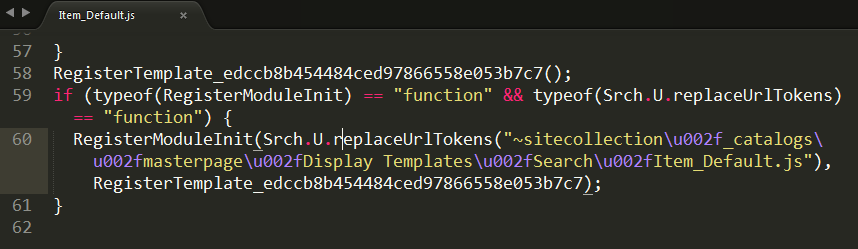
There are many correct ways (1, 2, 3, 4, 5…) of making scripts work with the Minimal Download Strategy Feature (MDS) in SharePoint 2013 and 2016. But to be honest - every time I need it, I get confused. So now it is time to find a simple solution for that. Who is better at it than the developers of the SharePoint themselves? Look at the MDS code in the built-in Display Templates: