Do not mess with the hive
In our Intranet we got this nasty double encoding error that was introduced in SharePoint April 2014 CU. In July 2014 CU the problem is still there. I often hear the suggestions to update files directly in the hive (the root folder for SharePoint: C:\Program Files\Common Files\microsoft shared\Web Server Extensions\15\) In that blog post it is described what the problem is and what files are affected and what code must be altered in order to get it to work (which I like). But it is also suggested to update the Search.ClientControls.js directly on the server (which I don’t like). So my advise is:
Load git into PowerShell
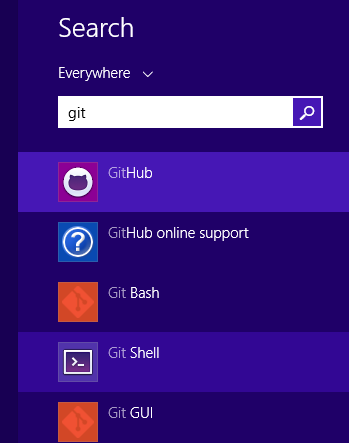
Just a little productivity tip. If you use git on Windows, you probably already have the Github for Windows application. This application adds the Git Shell:
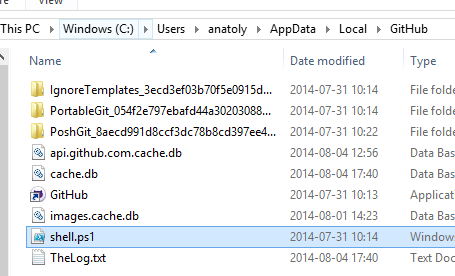
The Git Shell will open a PowerShell window and execute shell.ps1 from the Github directory:
What it won’t do is to load your personal PowerShell profile. I want to use my PowerShell profile that creates some links and adjust the look-and-feel and the promt of the shell. By the way I have published my profile.ps1 as a gist:
Updating hover style in IE8 Developer Tools
In our project we still have to support Internet Explorer 8. The CSS issues in IE8 are most difficult to debug and solve. You can not add a new rule in Developer Tools or toggle the state of an element to hover as in moder web browser dev tools. One solution that I’ve come up to today, is to add a style with javascript or jQuery, open the script pane in IE8 Dev Tools and add this line:
Masked Inputs
Just a quick tip today. If you are looking after masked inputs like the old ASP.NET Ajax Control Toolkit MaskedEdit, you can try jQuery plugin called Masked Input from DigitalBush or even better jquery.inputmask.
Toastr.js and SharePoint
Have you used SharePoint javascript Notifications (SP.UI.Notify)? Are you looking for something new and fresh? Well then check out the Toastr.js - a simple, beautiful, fully responsive and light-weight javascript lib for notifications, developed by John Papa and Hans Fjällemark and released under the MIT License. By the way, toastr was one of many things I discovered and learned on John Papa’s online course by pluralsight: Single Page Apps with HTML5, Web API, Knockout and jQuery. It is a really awesome course, where you learn how to create an amazing SPA. Well, how’s about SharePoint. While whatching the course videos about toastr, I thought: Can we use it in SharePoint? Yes we can! Just load the toastr css and js and start using it:
The original Visual Web Part template is missing in Visual Studio 2012
Today I encountered a weird issue, the classic Visual Web Part template was gone in Visual Studio 2012. When I created a Visual WebPart, a webpart was created with a generated .g.cs file, like the sandboxed visual webparts. I am not exactly sure why it happened. According to the MSDN guide Creating Web Parts for SharePoint, the structure of Visual Webparts should be the same as in Visual Studio 2010. It could have happened after I installed the power tools. However, if someone runs into the same issue, here is the solution: Copy this zip file from a computer with VS2010 installed:
javascript: developing for performance
Many words have been said about the importance of performance when working with javascript files. Here I want to summarize what developers can do to increase the performance related to javascript. I found many tips on blogs. Here comes my aggregated list of actions one can do to speed up sharepoint (and not only) sites with focus on javascript:
1. Load only sharepoint stuff you need
Use prefetch option to only load sharepoint javascript files that needed. To see the difference, just add ?prefetch=0 to your sharepoint url in the browser.  The downside of this lazy loading is that you wrap all sharepoint related javascript into ExecuteOrDelayUntilScriptLoaded otherwise you maybe invoke some of javascript objects and functions that are not loaded. So the prize of this huge performance improvement is a high awareness by a developer when and which scripts are loaded and run.
Out-Gridview in PowerShell
Did you know that we can pipe the output from PowerShell into a graphical GridView? I have used PowerShell for one year and only now I discovered this nice feature. You can add filter criteria, you can filter by typing in a textbox: 
Other useful output cmdlets
- out-file
- out-clip
- out-null
Add Comments column to your sharepoint list
If you have used Issue tracking list template in SharePoint you must have marked that the comments are added and marked with author name and datetime. It is handy to have these micro “discussion boards” on items. The comment-formed communication can help to fine-tune task definitions. By the way, have you seen Trello? So the question is how we can create this column in other lists? Here is a little tutorial how to create “append-only comments”, as they are called:
Powershell scripts for AD
A tip for all who want to administer AD with powershell: Idera Powershell scripts. Just sign up and get the free scripts for AD, SQL, Exchange and Sharepoint. I personally prefer to user modules, so I change the file extension from ps1 to psm1 and then I can use import functions as modules. Here is a simple example for creating for domain users:
import-module .\New-IADUser1.psm1
function Add-User($name) {
    New-IADUser -Name $name `
         -sAMAccountname $name `
         -ParentContainer 'CN=Users, DC=contoso, DC=com' `
         -Password 'SvenskaAkademien1786' `
         -EnableAccount -PasswordNeverExpires
}
Add-User "user01"
Add-User "user02"
Add-User "user03"
Add-User "user04"
update 2012-03-15: nice script from Ryan
Ryan Dennis has created a very handy script for creating random users. In PowerShell v3.0 there is a cmdlet for creating users: New-ADUser. So the function above can be rewritten like that: