parametrar i powershell-funktioner
Man kan skapa funktioner med parametrar som påminner mycket om i C#. Så i stället för:
function Just-Test {
    Write-Host $args\[0\]
}
```Skriv:
function Just-Test($param) { Write-Host $param }
if($site -ne $null -and $url -ne $null) {“Url OR Site can be given”; return}
Visa i hur länge sedan något hänt
Säg du vill visa när något har skapats. Att visa datum funkar. Ännu bättre är att visa det i stil: “För tre dagar sedan” eller så. Det finns en bra metod i SPUtility:
SPUtility.TimeDeltaAsString(Published, DateTime.Now);ID på befintliga kolumner
Det finns en fin lista över id på kolumner som man kan lägga till. Här är ett exempel hur man kan använda det. Här är ett exempel på två extra kolumner i contenttype:
<FieldRefs>
      <FieldRef ID="{23f27201-bee3-471e-b2e7-b64fd8b7ca38}"/>
      <!-- Enterprise Keywords-->
      <FieldRef ID="{3de94b06-4120-41a5-b907-88773e493458}"/>
      <!-- PublishingImage-->
</FieldRefs>.gitignore for android
.gitignore is very important. This file tells git which files not to care about. I found a good template for android .gitignore: .metadata tmp/** .DS_Store *.tmp *.bak tmp/**/* *.swp *~.nib Thumbs.db Desktop.ini *~ *.apk bin gen local.properties *.jar **.classpath** The only thing I have added is the last row: .classpath.
comments from wordpress
J. Pablo Fernández — 2011-04-02
Thanks for pointing to the missing .classpath, it’s now fixed on gitignore.com.
Good beginners' tutorial on android, eclipse and git
Smashing magazine has a pretty good tutorial how to start programming for android using git, github, eclipse and datastorage. I recommend: Get Started Developing For Android With Eclipse, Reloaded
New files in Eclipse
If there are new classes or files in the project (say you have got the latest version from github into existing workspace in Eclipse). In order for Eclipse to see them, right click on the package and press “Refresh”.
Get coordinates from Google Maps
To get longitude and latitude can be tricky at the first time. There are many ways to do this, e.g. getlatlon.com. Good enough, but not so practical if you want to collect many coordinates. You can’t search after street names, you only can scroll and drag. Another way is to use javascript to show the longitude and latitude. See this example. This works in all web browsers.Just find your object in Google Maps and paste this javascript in URL bar: javascript:void(prompt('',gApplication.getMap().getCenter())); You’ll be prompted the coordinates values. Just be sure the map is centered on your object. There is a third, even better way. Use javascript, but don’t be annoyed with prompts. In Chromium (or Google Chrome) navigate to maps.google.com find your object, open the Console in DevTools (press Ctrl-Shift-J). Right click on the object → Center the map here In console write: copy ( gApplication.getMap().getCenter().toString() ) So now you can paste it wherever you need it. But the best with it is: you can do whatever you want and need before copying. In LUSites, I save the coordinates another way, first latitude and then longitude. So I can shift values, trim unnecessary stuff and so on. Look at it: var loc = gApplication.getMap().getCenter().toString(); var locTrimmed = loc.replace(/[() ]/gi,""); var locArray = loc.split(","); var newLoc = locArray[1] + "," + locArray[0]; copy (newLoc) First I get the string of the coordinates. Then I erase the unnecessary stuff: (), blank space. After splitting I shift the longitude and the latitude and create a new string which is copied. Or, we can shorten this: var coordinates = gApplication .getMap() .getCenter() .toString() .replace(/[() ]/gi,"") .split(","); copy (coordinates[1] + "," + coordinates[0]); The same in one row (to copy-paste): var coordinates = gApplication.getMap().getCenter().toString().replace(/[() ]/gi,"").split(","); copy (coordinates[1] + "," + coordinates[0]); To avoid to copy this line of code, just press up arrow in the DevTools console.
Programmers notepad
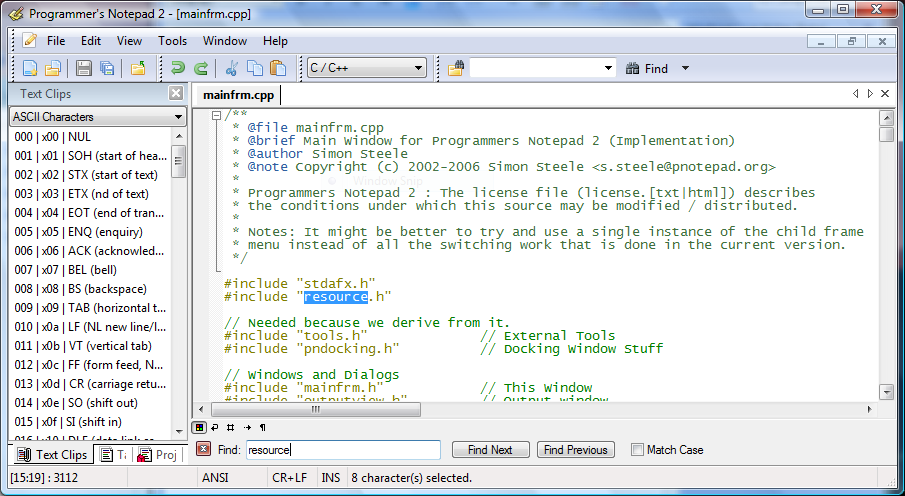 De flesta känner nog till Notepad++. Det finns en annan väldigt duktig textredigerare: Programmers notepad. Den är väldigt bra. code highlighting, filnavigering direkt i programmet mm. Testa gärna.
Powershell med tysk precision
Master Powershell ebookDe som har missat Powershell, läser nog andra sorts bloggar än denna. Så rak på sak: det finns en lovande ebook om Powershell, skriven av Tobias Weltner. Ska absolut läsa den. Ni som har läst, vad tycker ni om den? Master-PowerShell | With Dr. Tobias Weltner i html
 Vill du snabbt testa javascript, css och sånt, då är