Check if an html element is hidden using jQuery
Well, sometimes we need to calculate width and so on. In my next post I will write about how to fix auto-resize on fixed sized master pages. But now: a very nice stuff: how to check if an element is hidden or not:
$("#s4-leftpanel").is(":visible")
```It is a pure poetry. It reminds me of the beauty of [symbols in Ruby](http://rubylearning.com/satishtalim/ruby_symbols.html).Good pattern for javascript files
SP.js exists in two variants in debug mode and in modified. When you develop it is better to use debug mode. When it goes to production it is better to use minified files. The same you can do with your files. Wictor Wilen explains how to do minify your custom javascript files. I think it is a good pattern to create javascript files and call them something-something**.debug.js**. Then when you are done, run the custom tools to minify them.
Todolist in VS
A really nice feature is a task list. Just write //TODO something something in your code and it appears in the task list which can be shown through View - Task List in Visual Studio. 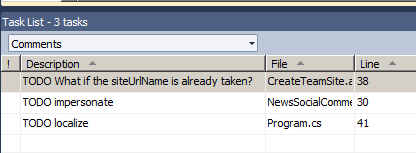
Increase performance while retrieving data with LINQ to SP
If you are just intrested in getting data, not writing to the source like SubmitChange, you can disable ObjectTracking and increase the performance.
context.ObjectTrackingEnabled = false;
```I found this tip on page 248 in the book "[Sharepoint 2010 as a development platform](http://www.apress.com/9781430227069)"Windows 8 preview
 I have tested the Windows 8 developer preview. VMWare player 3 didn’t manage it, so I installed VirtualBox and it ran very well. One thing I did was to enable full screen on VirtualBox. Here is the list of features you get if you install the developer preview:
- Windows SDK for Metro style apps
- Microsoft Visual Studio 11 Express for Windows Developer Preview
- Microsoft Expression Blend 5 Developer Preview
- 28 Metro style apps including the BUILD Conference app
1DayLater.com - the best time tracking
I discovered a great tool for time tracking: 1DayLater. So far I am very pleased. You can add activities, write hash tagged descriptions, get an overview over you consultant hours and much more
powershell.exe -Command
man kan skapa en .bat-fil med olika powershell-anrop:
powershell.exe -Command "& {.\\Script1.ps1}"Videokurs om Web Content Management
På microsoft.com finns en ny videokurs om web content management. Där kan du lära dig om hur man implementerar cms-funktionalitet med sharepoint, bl.a.: content types, page layouts med mera. Tack för tipset, deutschsprachige Sharepoint-Community.
Autocomplete för sökruta i Sharepoint
Ett mycket trevligt projekt: Search As You Type på Codeplex. Ladda ner textfilen och lägg till javascript och css från den filen till masterpage. Så enkelt är det. Jag har testat det genom att direkt stoppa in koden i Chrome Console.
uls logger
Det finns ett intressant projekt på codeplex: ULS Logger. Är absolut värt att testa.